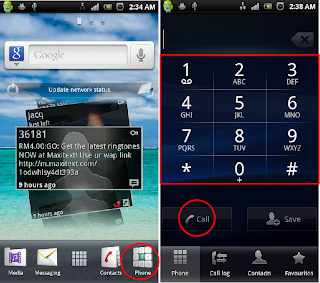
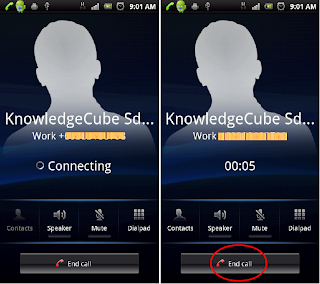
- Put call on loud speaker – tap the Speaker button
- Mute, so the other party cant hear you but you can listen – tap the Mute button
- Use the onscreen dialpad for automated transactions like Phone banking – tap the Dialpad

Looking at alternative computer software solutions for a variety of reasons. This includes price, computer security, virus prevention and reliability. Here are my notes and great that if it helps you, otherwise please understand what you are doing and not follow blindly. All works expressed are my own and does not necessarily express the products or organisations mentioned here.


| Category | Item | Notes |
|---|---|---|
| Logins | ||
| A.1 | Operating system -Administrator password is secured and recorded as only accessible by ONE administrator -All login's are done as normal user -Normal users with access to Administrator priviledges are recorded. Access should be via SUDO. -All logins are recorded | |
| A.2 | Application -All users to have secured logins -Administrator logins are assigned to specific individuals and listed -Web based self registered user must have email and spam prevention facilities -Lock down on Web server's user/application access -Default access and password for all administrator applications must be secured. This includes the main application, phpmyadmin, firewall. | |
| A.3 | Database -Each application to have a specific user and password access. This user cannot access other databases. -Administrator access is with secured password. Assignment to specific individuals must be recorded. | |
| Services | ||
| B.1 | Disable unnecassary services -Firewalls must be enabled to restrict external access to only the approved application (via port numbers). -Identify every services running. Disable those not in use. -Remote access must be via encrypted protocols -Disable local email server (e.g. sendmail) from runnin/listening continuously. Or use external email server. -Email servers controlled to allow access to specific application and directories. -Anti-virus if implemented, must have patches and pattern updates kept to the most recent. | |
| B.2 | Create a base point of security -A penetration test must be carried out. The type and complexity is based on the specific application. -Establish an integrity check point | |
| B.3 | Tell them you do not allow access -Place warning messages to all points of access. E.g. motd and issue.net | |
| B.4 | Logging -Log activities to separate files for operating system and application. -Make logs available to a centralised log server. | |
| B.5 | Backup -Establish a backup plan. -Implement a backup process | |
| B.6 | Create a boot disk and rescue of the Linux | |
| B.7 | System updates -Disable the automatic system updates. Updates should be installed only after it is verfied working with the application. -Periodically check with security issues, respective application security notices and update as needed. | |
| Physical | ||
| C.1 | Physical Access -Ensure only authorised personel can access to the server. -A record of physical access is maintained. | |
| C.2 | Storage Media -All storage media is tagged. -Storage location and transportation is secure and recorded. | |
| C.3 | Security Policy -Ensure the document is readily available to authorised users. | |
Checklist for Web Application (Deployment) by Nicholas A. Suppiah is licensed under a Creative Commons Attribution-ShareAlike 3.0 Unported License.
Permissions beyond the scope of this license may be available at http://www.blogger.com/profile/06749525177696246387.


The OSCC (oscc.org.my) has officially shifted address to MAMPU in Cyberjaya, Malaysia.


Installation on Linux KUbuntu 9.10


Choose following packages:
Install Firefox web browser
Choose Kmenu ->Internet ->Firefox Web Browser Installer
To allow Java applications to run in the web browser, open a terminal and install the openjdk plugin;
$ sudo apt-get install icedtea6-plugin
To get the wireless working, run at terminal this command and reboot. My wireless router for WPA, TKIP did not connect until following steps were taken. Open a terminal and type
$ sudo /etc/init.d/network-manager restart
Install the other stuff for common applications to be used. At the terminal run
$ sudo apt-get install msttcorefonts
For multimedia, fonts and assorted codecs support
This will add JRE, mp3, mpeg, odbc, unrar and other useful support.
$ sudo apt-get install kubuntu-restricted-extras
This allows the disk to be encrypted and manage passwords. Additional encryption can be downloaded from http://www.truecrypt.org/downloads or mediafire.
$ sudo apt-get install gdecrypt password-gorilla
Allow secure SSH connection to and from SSH servers.
$ sudo apt-get install ssh sshfs ksshaskpass kdessh
Install the VLC video player to watch CD and DVD movies.
$ sudo apt-get install vlc videolan-doc mozilla-plugin-vlc vlc-plugin-sdl libvcdinfo0
Install basic Thunderbird add-ons to enhance its usage. From a web browser enter the URL https://addons.mozilla.org/en-US/thunderbird
Download and install the following;
To improve web browsing, these are my download addons from https://addons.mozilla.org/en-US/firefox