Looking at alternative computer software solutions for a variety of reasons. This includes price, computer security, virus prevention and reliability. Here are my notes and great that if it helps you, otherwise please understand what you are doing and not follow blindly. All works expressed are my own and does not necessarily express the products or organisations mentioned here.
Thursday, August 2, 2012
Screen capture your Android phone
Step 1: Install the Android SDK.
Step 2: Switch the X10i debug.
Click "left" button, choose "Settings" ->"Applications" ->"Development".
Click to Check "USB Debugging".
Step 3: Plug USB cable between X10i and PC.
If asked to charge, choose that option.
Step 4: On the PC, start the Dalvik Debug Monitor (DDMS)
Click the Windows "Start" button, and type following and press "Enter" key.
cmd
Switch to the android directory and type following and press "Enter" key.
tools\ddms.bat
Ensure that you choose your phone from the left list. In my case its written as "XXX [SonyEricsson:X10i]". From the top menu of DDMS, click "Device" ->"Screen capture..."
Step 5: Capture the screen on the Android device (X10i)
On the X10i, select the screen to be captured (or saved).
Then on the PC, the DDMS should show the same screen as the Android, click "Copy". Start the graphics software such as GIMP or MS Paint and "paste" the screen capture. Save as the filename of your choice.
I have not used the "Save" button on DDMS, so I can't say where it saves to.
Wednesday, August 1, 2012
Bacula on Suse Linux
I started the search from the following site;
http://adrian.onsen.ca/2011/10/bacula-and-webmin-setup/
List of repos that can be used for the installation.
Bacula ver 5.2.1 + Suse 11
Webmin also list support as shown in http://www.webmin.com/cgi-bin/search_third.cgi?modules=1
Bacula Backup System 1.590
| Description | Configure Bacula to perform backups and restores manually or on schedule, for one or many systems |
| Download | bacula-backup.wbm.gz |
| Website | http://www.webmin.com/webmin/standard.html |
| Author | Jamie Cameron |
| Last updated | 2012-07-01 05:49:18 |
Will need to try again another day.
Wednesday, July 25, 2012
List of trainings - Linux
Linux for Web Developers - I
Objective: An intensive program to provide Web developers knowledge to manage basic development on a Linux platform.Pre-req: Participants must already know PHP programming.
Duration: 1day
Outline:
1. Introduction to Linux operating system
- Benefits of Linux, various distros, and the Centos Linux
2. Gnome, the Linux desktop
- Navigate common features of the desktop. Includes the file browsers, windows system, Systems configuration and start menu.
3. Editing text
- Use of the Gedit tool, saving files
4. The Linux Command Line Interface (CLI)
- Accessing the CLI, using BASH basic commands and text file editing
5. Getting help and the man
- Help from the windows, application, internet and man pages
6. Linux file system
- Basics of the folder convention, HOME folder, editing folders and folder permissions.
7. Software management - I
- Basics on package managers, YUM and RPM. Identify software packages installed, add and remove.
8. Manage development services - I
- Monitor status, start and stop Apache, MySql. Identify configuration files for Apache, MySql and PHP (AMP)
9. Troubleshooting the AMP in LAMP.
- Determine disk space utilisation, access Linux and Apache log files. Writing a web page to show phpinfo.
Linux for Web Developers - II
Objective: Manage tools used for web application development on Linux platform.Include graphic editors, manage installation of software, work with Eclipse editor. Writing php codes and installing additional php modules.
Connecting to a remote linux to access the shell commands and transfering files.
Saturday, July 21, 2012
Blogger app from Google Inc needs a lot more of work.
Just installed the app on ICS.
It doesn't provide numbering list and other basic formatting.
My previous postings all appear in html edit view. No options visible to switch editing modes.
Option for tagging as labels are not very intuitive.
Possibly the developer is a single person from Google payroll or was it out sourced to India? Hmm....
Develop Android Apps with Eclipse on Centos 6
[Update for Centos 6.3]
Installing Eclipse Indigo for Android on Centos 6.
Pre-installation check list:
- Java JDK 1.6 or higher is installed
PATH and CLASSPATH has been configured
yum install glibc.i686 ncurses-libs.i686 libstdc libstdc++.i686 \ libzip.i686 libX11 i686 libXrandr.i686 SDL.i686 gegl.i686
Steps 1. Eclipse Indigo
Download and install the Indigo version of Eclipse.
Default yum install from Centos 6.3 provided only the older version of Eclipse (Helios) which have too many dependency problems after install.
2. Android SDK
a) download and run installer from http://developer.android.com/sdk/index.html
Current version is named android-sdk_r20.0.3-linux.tgz size of which is about 78Mb.
tar -xvzf android-sdk_r20.0.3-linux.tgz
mv android-sdk /opt/android-sdk
chmod -R a+w /opt/android-sdk
Open the user's $HOME/.bash_profile and add before the last l
PATH=$PATH:/opt/android-sdk/tools:/opt/android-sdk/platform-tools
Follow instructions from http://developer.android.com/sdk/installing/index.html
b) Run the Android SDK Manager
Currently target for API 10 (Android 2.3.3) and API 16 (Android 4.0.1).
3. Eclipse's ADT plugin
a) Start Eclipse and select Help-> Install New Software, click Add (top right)
b) At right of "Work with:", Click Add... and enter the ADT Plugin repository details
https://dl-ssl.google.com/android/eclipse/
c) In Available Software, check Developer Tools and install.
Accept all license agreement.
d) Restart Eclipse
e) Eclipse may assign the Android SDK directory
or
Choose preferences and point to the Android SDK folder (see Section 2).
e.g. /opt/android-sdk
4. Create your first App, see http://developer.android.com/training/basics/firstapp/index.html
Installing msttcorefonts on Centos 6.3
Install tools to create fonts and directories (fake ones for compatibility).
yum install ttmkfdir rpmdevtools
note: ensure all RPM building tools have been installed (see my previous post).
Install ATRPMS repository and MS Fonts.
(I am using, x86_64 for remainder of notes)
rpm -ivh rpmbuild/RPMS/noarch/msttcorefonts-2.0-1.noarch.rpm
(open Libreoffice or Character Map, see if the Arial, Georgia and Times New Roman are available)
If fonts are not appearing, run following then relog-in (Do not run these if above steps work)
References: http://corefonts.sourceforge.net/
Installing Centos 6 on HP Probook 4420s
Laptop specs:
RAM 4Gb
CPU: i3 ...
Installed (default)
Linux kernel 2.6.32-220.el6.x86_64
Gnome 2.28.2
Mozilla Firefox 10.0.5
Add RPMFORGE software repository (libary of software)
(download the rpm)
(reboot)
Post-Installation
Login as root at the terminal and first few software to be installed (type this out):
yum groupinstall "Desktop" "Desktop Platform" "X Window System" "Fonts"
yum install madwifi
(reboot)
yum install flash-plugin
yum install vlc
yum install libreoffice
(total 25 package, 103Mb download)
yum install libreoffice-ogltrans
Notes: wifi can only be configured easily when linux is in graphical screen/desktop.
Prepare to build from source
yum install cabextract rpm-build
Other observations
- The touchpad (black square at center of laptop that helps to move the mouse) is having a soft LEFT and RIGHT button (not working correctly)
- To drag windows, press bottom half of the Touchpad until a click is felt. Then drag without leave finger from the Touchpad.
- To RIGHT click in window, you need to press bottom half then do a second click without lifting the first finger.
- Install from (HP) or better still to use a mouse pointer.
- Music
- Default "Totem Music Player" doesn't support MP3. Need to install gstreamer-plugins-ugly
- Webcam
- Runinng "Cheese" I can adjust to higher resolutions but its frames per seconds is very little. This causes the video to seem very poor quality.
- Option to edit the menu bar (add new items manually) is missing. Installed alacarte package, logout then back in to enable editing of menu items.
- If boot was to only command line (a black screen), switch to graphical. Type init 5.
Thursday, July 5, 2012
Out of phone storage space on x10i
"Phone storage space is getting low."
So, I did a backup (see HERE) then a factory reset to clear all data. Maybe some of the slowness issues on the X10i will be resolved.
Note: Free apps may not be automatically reinstalled. I have not figured out why.
Here are steps for the factory reset.
Step 1: Start the reset
On the X10i, Left click, and in menu choose "settings".
Choose "Factory data reset"
Do not choose "Erase SD card", because all my photos and backup is there.
Click "Reset phone"
Click "Erase everything"
The phone will power off (shut down)
Step 2: Start the x10i
The phone will restart, press the middle button and unlock the phone.
Choose Language,
Choose step 2/6 and change the date and time.
Choose step 5/6, set up the google, email account. What about Sony Ericsson sync (not working)?
Sony Ericsson sync was asking to select your country, but listed only 8 names and didn't list mine. It then says service is discontinued
Click in step 6/6 click "Finish".
Backup X10i phone with Gingerbread
Several Android apps are available for backup of the Android 2.3.3 (Gingerbread) and this includes;
- Titanium Backup * root
- MyBackup pro (RERWARE, LLC), with free limited 30 trial
- SMS Backup & Restore (RITESH SAHU)
- Contact numbers,
- SMS,
- APN settings,
- SDCard data,
Installing PHPMYADMIN on Centos 6
PHPMyadmin is a web front end to manage MySQL databases. It can be installed on the same server as the database or on a separate server.
Step 1: Open a Linux command line terminal (CLI)
Login as root or administrator.
Step 2: Increase the software repository with rpmforge
Browse for the packages and download from http://packages.sw.be
or
wget http://packages.sw.be/rpmforge-release/rpmforge-release-0.5.2-2.el6.rf.i686.rpm
Select the 64bit version if your machine supports it.
Install the keys from DAG.
rpm --import http://apt.sw.be/RPM-GPG-KEY.dag.txt
Install the rpmforge files to access the repository.
rpm -i rpmforge-release-0.5.2-2.el6.rf.*.rpm
Refer to http://wiki.centos.org/AdditionalResources/Repositories/RPMForge/ for details
Step 3: Install phpmyadmin
yum --enablerepo=rpmforge install phpmyadmin
Step 4: Using a web browser point to the server installed with phpmyadmin.
E.g.
http://localhost/phpmyadmin
where
You should be able to see the main page of phpmyadmin.
Develop Android 4 Apps with Eclipse
So, you want to start on Android Programming? Read on...
Installing Eclipse Indigo for Android on MS Windows 7.
Pre-installation check list:
- Java JDK 1.6 or higher is installed
- PATH and CLASSPATH has been configured
Steps
1. Eclipse Indigo
a) download and extract Eclipse
http://www.eclipse.org/downloads/download.php?
file=/eclipse/downloads/drops/R-3.7.2-201202080800/eclipse-SDK-
3.7.2-win32.zip
b) Move to the Program files folder
e.g. c:\Windows\Program Files\eclipse
2. Android SDK
a) download and run installer_r18-windows.exe
http://developer.android.com/sdk/index.html
Follow instructions from http://developer.android.com/sdk/installing/index.html
b) Run the Android SDK Manager
Currently target for API 10 (Android 2.3.3) and API 15 (Android 4.0.3).
Accepted all package to install but HTC OpenSense SDK.
3. Eclipse's ADT plugin
a) Start Eclipse and select Help-> Install New Software, click Add (top right)
b) At right of "Work with:", Click Add... and enter the ADT Plugin repository details
https://dl-ssl.google.com/android/eclipse/
c) In Available Software, check Developer Tools and install.
Accept all license agreement.
d) Restart Eclipse
e) Eclipse may have problem locating the Android SDK directory
Choose preferences and point to the Android SDK folder (see Section 2).
e.g. c:\Windows\Program Files\Android\android-sdk
4. Create your first App, see http://developer.android.com/training/basics/firstapp/index.html
Saturday, April 28, 2012
Fatal error: Allowed memory size of 134217728 bytes exhausted (tried to allocate 65536 bytes) in ....
Where is the problem?
Facts:
134,217,728 bytes is equivalent to 128MB. These numbers indicate that a limit of some memory has been reached.
2 power of 16 = 65536
2 power of 27 = 134217728
There some sites that suggest to increase the memory limit of PHP with memory_limit directive in php.ini file. But this will only prolong the problem to another day. How are you going to keep increasing the memory limit?
Possible approach:
- Some where along the setup, the application is eating up memory through an infinite loop. Review location of the application file (model) that is causing the error.
- It states "Fatal error" and not "Php Fatal error", indicating Apache web server is sending the error instead of PHP. Check if web server was restarted after the memory_limit was increased in the /etc/php.ini file.
- Database configuration needs to be edited for large selects or join processing. (High performance Innodb)
Troubleshooting (approach 1):
- Use phpinfo() to compare the memory_limit with what was set in php.ini file. Check Loaded Configuration File, did it say which php.ini file was loaded? This file can be placed in many places.
- In PHP, apply the memory_get_usage() to display memory in used.
- For database related calls, use the function mysql_free_result() to release memory used by variables.
- If the memory grows large, it may be possible to remove the object from the memory via the unset() function.
- Create a large database and execute various calls via the web browser. Sample large database can be found at Wikipedia.
Monday, April 9, 2012
Installing Java on Centos 6
Installation of Java for compilation and the Java Runtime Environment (JRE) for a Centos 6 server. Additional Java applications can be found from rpmforge.
# yum install java-1.7.0-openjdk-devel.i686 java-1.7.0-openjdk-javadoc.noarch
Step 2: Verify installation
# lsb_release -a
LSB Version: :core-4.0-ia32:core-4.0-noarch:graphics-4.0-ia32:graphics-4.0-noarch:printing-4.0-ia32:printing-4.0-noarch
Distributor ID: CentOS
Description: CentOS release 6.3 (Final)
Release: 6.3
Codename: Final
Monday, October 17, 2011
Camera on SE X10i (Android 2.3)
- Select Camera mode icon, and tap Touch capture. (optional if already selected)
- Point the camera to the person or object, press on the screen where is the desired focus.
- Release finger, to take the photo.
- Point the camera to the person or object.
- Half press the Camera button, to focus.
- Press Camera button down fully to take the photo.

Thursday, October 13, 2011
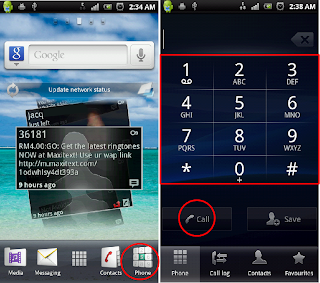
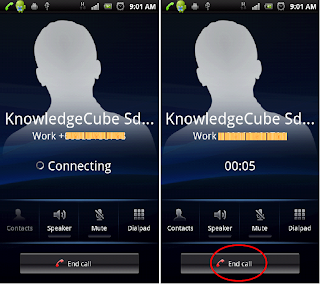
Call handling on SE X10i (Android 2.3)

- Put call on loud speaker – tap the Speaker button
- Mute, so the other party cant hear you but you can listen – tap the Mute button
- Use the onscreen dialpad for automated transactions like Phone banking – tap the Dialpad

Monday, June 27, 2011
Clone a VirtualBox disk
1. Start VirtualBox graphical interface (GUI), and edit settings for the VM using the disk we wish to clone. E.g VM name is centos and the virtual disk as centos_hdd.vdi
2. Remove (Do not delete) this disk from the VM.
3. At a command prompt
VBoxManage clonehd centos_hdd.vdi copy_centos_hdd.vdi
VBoxManage internalcommands setvdiuuid copy_centos_hdd.vdi
The first command duplicates the virtual disk. In the second command we assign a new UUID to the new disk (copy_centos_hdd.vdi)
4. Return to VirtualBox GUI and attach back the centos.vdi to the VM.
5. Create a new VM to attach the copy_centos_hdd.vdi
The new virtual machine is ready to use the cloned virtual disk. As a note, why not just make more copies of the disk with new UUIDs in case you need another image.
Thursday, June 23, 2011
An Open source software antivirus called ClamAV
It can be used in 3 different ways:
- Installed on a PC. It can be scheduled to run at specific times or to scan all new storage medium and incoming files.
- Installed on a server. It is used in conjunction with server services such as email servers, backup and file servers.
- Application built with the ClamAV library. Customised applications can manage how and when the file scannings are done.
I just ran an update, output as below:
daily.cvd updated (version: 13231, sigs: 130699, f-level: 60, builder: arnaud)
WARNING: Your ClamAV installation is OUTDATED!
WARNING: Current functionality level = 58, recommended = 60
DON'T PANIC! Read http://www.clamav.net/support/faq
bytecode.cvd is up to date (version: 143, sigs: 40, f-level: 60, builder: edwin)
Database updated (976953 signatures) from db.local.clamav.net (IP: 222.124.18.201)
Configuration of the ClamAV installed can be inspected with the command clamconf, and the virus scanner GUI is simple to use.

Tuesday, June 14, 2011
Linux security checklist
Follow up from my previous post, I realise that many Linux Admins out there do not have a Security Checklist for their web application. I am sharing the following checklist here as it provides a standard security consideration for almost all web application on Linux or LAMP stack. It is by no means the only security guide, please apply all other security concerns specific to your needs and you can then sleep better at night.
| Category | Item | Notes |
|---|---|---|
| Logins | ||
| A.1 | Operating system -Administrator password is secured and recorded as only accessible by ONE administrator -All login's are done as normal user -Normal users with access to Administrator priviledges are recorded. Access should be via SUDO. -All logins are recorded | |
| A.2 | Application -All users to have secured logins -Administrator logins are assigned to specific individuals and listed -Web based self registered user must have email and spam prevention facilities -Lock down on Web server's user/application access -Default access and password for all administrator applications must be secured. This includes the main application, phpmyadmin, firewall. | |
| A.3 | Database -Each application to have a specific user and password access. This user cannot access other databases. -Administrator access is with secured password. Assignment to specific individuals must be recorded. | |
| Services | ||
| B.1 | Disable unnecassary services -Firewalls must be enabled to restrict external access to only the approved application (via port numbers). -Identify every services running. Disable those not in use. -Remote access must be via encrypted protocols -Disable local email server (e.g. sendmail) from runnin/listening continuously. Or use external email server. -Email servers controlled to allow access to specific application and directories. -Anti-virus if implemented, must have patches and pattern updates kept to the most recent. | |
| B.2 | Create a base point of security -A penetration test must be carried out. The type and complexity is based on the specific application. -Establish an integrity check point | |
| B.3 | Tell them you do not allow access -Place warning messages to all points of access. E.g. motd and issue.net | |
| B.4 | Logging -Log activities to separate files for operating system and application. -Make logs available to a centralised log server. | |
| B.5 | Backup -Establish a backup plan. -Implement a backup process | |
| B.6 | Create a boot disk and rescue of the Linux | |
| B.7 | System updates -Disable the automatic system updates. Updates should be installed only after it is verfied working with the application. -Periodically check with security issues, respective application security notices and update as needed. | |
| Physical | ||
| C.1 | Physical Access -Ensure only authorised personel can access to the server. -A record of physical access is maintained. | |
| C.2 | Storage Media -All storage media is tagged. -Storage location and transportation is secure and recorded. | |
| C.3 | Security Policy -Ensure the document is readily available to authorised users. | |
Checklist for Web Application (Deployment) by Nicholas A. Suppiah is licensed under a Creative Commons Attribution-ShareAlike 3.0 Unported License.
Permissions beyond the scope of this license may be available at http://www.blogger.com/profile/06749525177696246387.
Monday, June 13, 2011
Linux security for organisations
The recent spate of security breaches at Citibank, USA and Sony Online Entertainment (SOE), Sony Playstation tells us a lot about the amount of importance organisations put on security. In 2009, There were words that Citibank was robbed and in 2011, there was a breach to over 200,000 USA Citibank card holders in the Citigroup. ZDNet in 2011, "Sony security hole exposes another 24.6 million accounts" tells about how over 100 million users can be affected by failures on security. Maybe Sony Certified Security Professional needs to consider a systems security program for Sony (I am joking).
Other security compromised news (hacked) in 2011
- Vendor-sec email list was compromised and this was a discussion on linux vulnerabilities at openwall.com
- Wordpress.com root access was gained to their servers. Nothing else much on extend of damage to users or blogs at wordpress.com
- Mobile devices like Android could potentially have user data compromised when using public wifi, says University of Ulm, Germany
- International Monetary Fund (IMF), network break-in sounded like it was blamed to the staff use of internet and emails when read in ZDNET.
- Lockheed Martin, provider of defence technology breach in their remote access via use of tokens affected Pentagon.
- GMail major phishing was traced back to China and Google looks geared up for more changes as spear-phishing becomes a term many would see more often.
- In Malaysia, the newly launched 1Malaysia Pengguna Bijak's portal costing RM1.4 million wasn't built with safe guarding the users information at all. Here the only explaination (NO apology to the rakyat) was that the system was not built to cope with the 3 million hits it received within 2 days of its launching. Over 2,000 1Pengguna user account details were confirmed compromised. I took it as a government initiative but the name www.1pengguna.com made me wonder if its a Malaysian government effort or a private business.
Over the years of implementing Linux based solution, there are a few basic things I can share when deploying web applications and other similar systems.
- Put a security policy in place. This includes security administrators reading emails from public who voluntarily lodge about security flaws.
- Budget to implement these policies
- Have security checklists (use it, audit with it)
If disaster happens, you just need to fix it. There are people's "life" at stake. At the same time get those culprits, if you can.
Wednesday, May 4, 2011
What are Perlis students going to do with Netbooks?
Not reported how it will be usable to the students. Or if they have internet access.
Schools should prepare wifi so that these students can access education freely in school.