Listing of Linux commands.
Hardware related
dmidecode = display computer hardware information. E.g. dmidecode -s bios-version
ifconfig = display and configure the network interface. E.g. ifconfig -s eth1
lshw = display hardware
lspci = display the PCI buses in the computer. E.g. lspci -tv
xrandr = display and configure the available displays (output) connected to the computer.
File system
find = search in specified directory for files.
locate= search for files in the system as index by the locatedb database.
-
Sunday, June 29, 2008


Thursday, June 26, 2008
R60 and wireless
The default Centos 5.1 does not detect the wireless on the Thinkpad R60. It seems to detect perfectly well using Ubuntu 7.10.
Go to CentOS page and install the RPMForge plugin.
yum install dkms-ipw3945
lsmod |grep ipw
Done..the wireless card is detected but still cant seem to get the wireless network. After some more digging, found that the ipw3945 project has been deprecated and superseded by Iwlwifi at http://intellinuxwireless.org
Below are notes to try, but I have yet to find the apps that is talk to the wifi daemon that connects to the wireless network.
The ATRpms repository contains Iwlwifi. Plugin to the wired network. Edit the repo file with
Install the drivers
yum install iwlwifi iwlwifi-kmdl-`uname -r`
Go to CentOS page and install the RPMForge plugin.
yum install dkms-ipw3945
lsmod |grep ipw
Done..the wireless card is detected but still cant seem to get the wireless network. After some more digging, found that the ipw3945 project has been deprecated and superseded by Iwlwifi at http://intellinuxwireless.org
Below are notes to try, but I have yet to find the apps that is talk to the wifi daemon that connects to the wireless network.
The ATRpms repository contains Iwlwifi. Plugin to the wired network. Edit the repo file with
[atrpms]
name=EL $releasever - $basearch - ATrpms
baseurl=http://dl.atrpms.net/el$releasever-$basearch/atrpms/stable
gpgkey=http://ATrpms.net/RPM-GPG-KEY.atrpms
gpgcheck=1
enabled=1
exclude=*kmdl*i586*
includepkgs=*iwlwifi* *mac80211*
Since gpgcheck is enabled, run the command
rpm --import http://ATrpms.net/RPM-GPG-KEY.atrpms
name=EL $releasever - $basearch - ATrpms
baseurl=http://dl.atrpms.net/el$releasever-$basearch/atrpms/stable
gpgkey=http://ATrpms.net/RPM-GPG-KEY.atrpms
gpgcheck=1
enabled=1
exclude=*kmdl*i586*
includepkgs=*iwlwifi* *mac80211*
Since gpgcheck is enabled, run the command
rpm --import http://ATrpms.net/RPM-GPG-KEY.atrpms
Install the drivers
yum install iwlwifi iwlwifi-kmdl-`uname -r`
Friday, June 20, 2008
Cases on why we need to be open sourced
Listed here will be cases that can bring back reasons to why we need to be open sourced in many cases.
- Klien from AT&T - 2007 case on findings of the NSA, USA using the telco line to tap into calls. See "Spying on the home front".
- Online Voting - such software must require that no funny stuff happens in the background and exploits can be exposed soonest for a resolution.
Viewing the network
The Nessus tool provides information on your network. This means installing a Nessusd server, then data can be continuously collected. Using a Nessus client, the information can then be made into more manageable form.
After installing Nessus
Get the updates of plugins from nessus (http://www.nessus.org/register)
Check your email for the registration code (Example XXXX-11A0-B9A4-A2DD-xxxx)
On the Linux:
sudo /usr/bin/nessus-fetch --register
After installing Nessus
Get the updates of plugins from nessus (http://www.nessus.org/register)
Check your email for the registration code (Example XXXX-11A0-B9A4-A2DD-xxxx)
On the Linux:
sudo /usr/bin/nessus-fetch --register
Wednesday, June 18, 2008
Problems with FTP
Traditionally, electronic files such as scripts, graphics, documents and spreadsheet was transfered between computers with FTP (File Transfer Protocol). The files could be placed in public places for anyone to access with a login name or as anonymous.
However, the alternative to FTP is sFTP (secure File Transfer Protocol). What is the problem with FTP? Why stop using FTP?
sFTP is a completly different protocol (method) of network file transfer.
However, the alternative to FTP is sFTP (secure File Transfer Protocol). What is the problem with FTP? Why stop using FTP?
- FTP sends the login username and password across the network as clear text.
- Typical network firewall needs to be altered to open up min 2 ports for FTP.
- FTP communication talks too much. A typical connection goes like this, you contact the server, do handshake, you the get a banner, you then send your name to the server and wait for the server to acknowledge. Then you send your password (in plain clear view for everyone to see) and wait for the server to acknowledge, then you send the type of inquiry (how you want the server to respond). This isnt even anywhere near the actual transfer of the file.
- FTP does synchronous communications.
- Complex firewall configuration for FTP servers and FTP clients. FTP servers prefer active transfer while opening inbound port 21, outbound port 22. FTP client firewalls prefer passive transfer while opening outbound from any port to port 21, inbound any port to any permitted (ephemeral) port.
sFTP is a completly different protocol (method) of network file transfer.
Monday, June 16, 2008
Multiple X servers - Xephyr and Xnest
To run several X servers that are different, I can switch to other virtual screens (F7-F12) or use an X server tool like Xephyr and Xnest. Xephyr is considerably newer than the well known Xnest.
Using Xnest
(On CentOS 5.1)
yum install xorg-x11-server-Xnest
Xnest -audit 0 -name Xnest :1 & export DISPLAY=:1
Using Xephyr
(on Ubuntu 7.10)
sudo apt-get install xserver-xephyr
Xephyr -ac -screen 1024x768 -reset :1 & export DISPLAY=:1
Running X on the X server
Test X applications like xterm and xeyes.
xterm
xeyes
If there is a need to send an application via the chroot/server use SSH. Example below is to start and xterm on the X server
ssh -XfC -c blowfish nicholas@nicholas-server.lan xterm
If you dont understand stuff here, dont worry. It means you need to move on to other stuffs.
Using Xnest
(On CentOS 5.1)
yum install xorg-x11-server-Xnest
Xnest -audit 0 -name Xnest :1 & export DISPLAY=:1
Using Xephyr
(on Ubuntu 7.10)
sudo apt-get install xserver-xephyr
Xephyr -ac -screen 1024x768 -reset :1 & export DISPLAY=:1
Running X on the X server
Test X applications like xterm and xeyes.
xterm
xeyes
If there is a need to send an application via the chroot/server use SSH. Example below is to start and xterm on the X server
ssh -XfC -c blowfish nicholas@nicholas-server.lan xterm
If you dont understand stuff here, dont worry. It means you need to move on to other stuffs.
Installing KDE on Ubuntu (Kubuntu)
Ubuntu 7.10 (Gutsy) by default installs the GNOME desktop (2.20.0). To install the KDE desktop (reasons are many) many more applications can then be accessed by the Linux system. This at the same time make the Ubuntu transform into Kubuntu!
Simple installation
Simple installation
- Connect to the Internet
- Run the command
- sudo aptitude update && sudo aptitude install kubuntu-desktop
- Reboot the system. At the bottom left of the login swcreen change the login option to KDE.
- Configuration of the default desktop can be done by editing the file /etc/X11/default-display-manager to either KDE or GNOME
- /usr/bin/kdm
- /usr/bin/gdm
- To remove KDE, if you found that it was a big mistake be glad that you used aptitude. Run command
- sudo aptitude remove kubuntu-desktop
- Edit sources.list to include the KDE4 resources
- deb http://ppa.launchpad.net/kubuntu-members-kde4/ubuntu gutsy main
- Update aptitude
- sudo aptitude update
- Install KDE4
- sudo aptitude remove kdelibs5 kde4base-data kde4libs-data
- sudo aptitude install kde4-core
- Reboot, at the login screen select the option for KDE 4.
Friday, June 13, 2008
CentOS kernel
The Linux kernel can be reconfigured directly or through the use of modules.
I found the following link useful for CentOS;
1. http://wiki.centos.org/HowTos/BuildingKernelModules
2. I need to build a custom kernel
I found the following link useful for CentOS;
1. http://wiki.centos.org/HowTos/BuildingKernelModules
2. I need to build a custom kernel
Thursday, June 12, 2008
OSS Seminar 08 - Miri
The OSS Seminar on 9th Jun 08 really was an opener for most of the participants from Sabah, Sarawak and Labuan Public Sector.

See OSCC MAMPU website for the details.
 Apart from presenting a paper on Building OSS Competency, I am mainly taking care of the AV. I'd like to point out an instance where the overhead projector could only flicker the Linux screen intermittent. The video projector model was Sanyo XtraX and was mounted on the ceiling as shown below.

After changing over 2 different VGA cables and checking the connections, nothing improved. Some put it to the Linux being the problem, as other functions were said to have ran smoothly. The AV man finally came and brought a VGA switch with built-in booster, this managed to put the display on the large screen. When another two more projectors were used with a splitter, there were lines scrolling vertically. This was for the projector screens at the sides. This showed that there is not enough power supplied to the projectors.

See OSCC MAMPU website for the details.
 Apart from presenting a paper on Building OSS Competency, I am mainly taking care of the AV. I'd like to point out an instance where the overhead projector could only flicker the Linux screen intermittent. The video projector model was Sanyo XtraX and was mounted on the ceiling as shown below.
After changing over 2 different VGA cables and checking the connections, nothing improved. Some put it to the Linux being the problem, as other functions were said to have ran smoothly. The AV man finally came and brought a VGA switch with built-in booster, this managed to put the display on the large screen. When another two more projectors were used with a splitter, there were lines scrolling vertically. This was for the projector screens at the sides. This showed that there is not enough power supplied to the projectors.
Wednesday, June 11, 2008
Mobile phone tools
Listing
Wammu
Wammu is a tool to connect with mobile phones and uses Gammu and Phyton. Phones that support open standards like OBEX and IrMC can be easily accessed by OSS tools like Gammu. For a list of phones supported by Gammu see Chihar.com.
Lets install Wammu!
Installation of Wammu takes about about 15.1Mb disk space. Current version for Ubuntu 7.10 is 0.22-1. Those who are using IMAP server access with the phone need to update to Wammu 0.27 or newer.
sudo apt-get install wammu
sudo apt-get install gammu python-gammu-doc wx2.6-doc wx2.6-examples
Plugin the USB cable to the PC/Laptop and phone.
Choose Applications ->Accessories ->Wammu
Note: btctl is needed for Bluetooth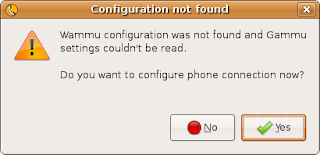
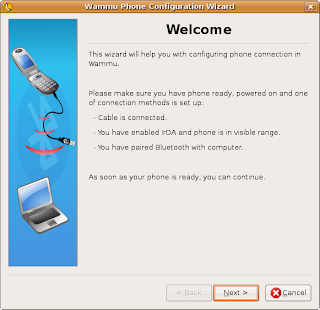
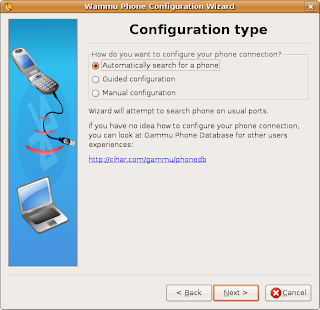
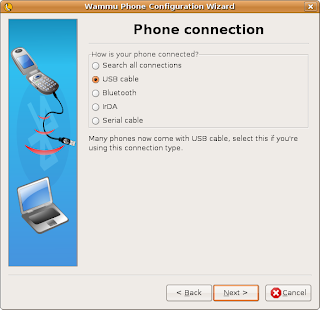
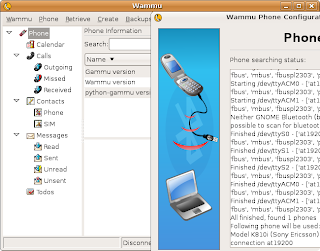
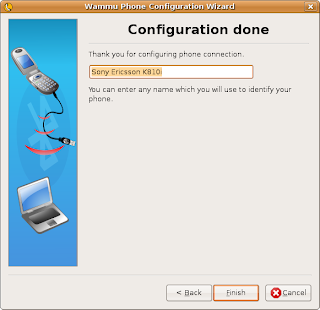
Choose Phone ->Connect
To get the contents of the phone choose Retrieve then selected any of the sub items below;
Mobile Media Converter - Converting AMR and 3GP to MP3 and MPEG
The SE K810i and most other mobile phone that supports audio recording, stores the sound in AMR format. The Mobile Media Converter can be used to convert following files:
Audio: AMR files to MP3, WAV, WMA format
Movie: 3GP files to MPEG
(Tested on Ubuntu 7.10)
Step 1: Download Mobile Media Converter from http://miksoft.net/mobileMediaConverter.htm
Step 2: Extract the file mmc-lin.tar.gz and you get the directory mmc-lin
Step 3: Change into the directory mmc-lin and run the programme
Mobile Media Converter
Note: There is a FFMPEG that have been compiled to support AMR and 3GP
- Wammu
- Mobile Media Converter
Wammu
Wammu is a tool to connect with mobile phones and uses Gammu and Phyton. Phones that support open standards like OBEX and IrMC can be easily accessed by OSS tools like Gammu. For a list of phones supported by Gammu see Chihar.com.
Lets install Wammu!
Installation of Wammu takes about about 15.1Mb disk space. Current version for Ubuntu 7.10 is 0.22-1. Those who are using IMAP server access with the phone need to update to Wammu 0.27 or newer.
sudo apt-get install wammu
sudo apt-get install gammu python-gammu-doc wx2.6-doc wx2.6-examples
Plugin the USB cable to the PC/Laptop and phone.
Choose Applications ->Accessories ->Wammu
Note: btctl is needed for Bluetooth


Choose Phone ->Connect
To get the contents of the phone choose Retrieve then selected any of the sub items below;
- Contact
- Calls
- Messages
- Todos
- Calendars
Mobile Media Converter - Converting AMR and 3GP to MP3 and MPEG
The SE K810i and most other mobile phone that supports audio recording, stores the sound in AMR format. The Mobile Media Converter can be used to convert following files:
Audio: AMR files to MP3, WAV, WMA format
Movie: 3GP files to MPEG
(Tested on Ubuntu 7.10)
Step 1: Download Mobile Media Converter from http://miksoft.net/mobileMediaConverter.htm
Step 2: Extract the file mmc-lin.tar.gz and you get the directory mmc-lin
Step 3: Change into the directory mmc-lin and run the programme
Mobile Media Converter
Note: There is a FFMPEG that have been compiled to support AMR and 3GP
OpenOffice.org Document Recovery screen
After using OOo 2.4 for sometime some of the following can happen:
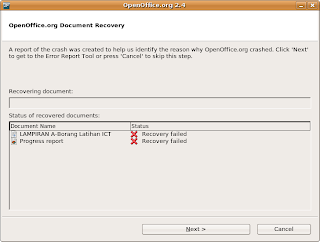
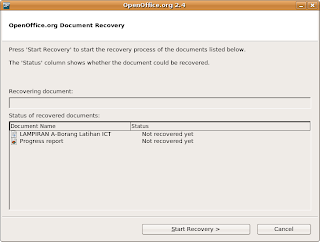
And they keep appearing even after you reboot the PC/laptop.
The solution:
Delete the file XML file named Recovery.xcu found in the locations shown below. Take note that Recovery.xcu contains the settings for Recovery in the Tools ->Options ->Load/Save ->General dialog.
In MS Windows
"Documents and settings"/<user>/"Application data"/Openoffice.org2/user/registry/data/org/openoffice/Office/Recovery.xcu
For OOo3 in MS Windows
"Documents and settings"/<user>/"Application data"/Openoffice.org/3/user/registry/data/org/openoffice/Office/Recovery.xcu
In Linux (I am using Ubuntu 8.10)
~/.openoffice.org2/user/registry/data/org/openoffice/Office/Recovery.xcu
-
- No electric - you loose a document
- Laptops run out of juice - you loose a document
- The OOo document is moved/renamed - OOo didnt detect the changes since it was done within OOo (Save as).


And they keep appearing even after you reboot the PC/laptop.
The solution:
Delete the file XML file named Recovery.xcu found in the locations shown below. Take note that Recovery.xcu contains the settings for Recovery in the Tools ->Options ->Load/Save ->General dialog.
In MS Windows
"Documents and settings"/<user>/"Application data"/Openoffice.org2/user/registry/data/org/openoffice/Office/Recovery.xcu
For OOo3 in MS Windows
"Documents and settings"/<user>/"Application data"/Openoffice.org/3/user/registry/data/org/openoffice/Office/Recovery.xcu
In Linux (I am using Ubuntu 8.10)
~/.openoffice.org2/user/registry/data/org/openoffice/Office/Recovery.xcu
-
Tuesday, June 10, 2008
Transfer phonebook from Motorola V360 to SE K810i
I just purchased a Sony Ericsson K810i to replace the Motorola V360. I've had the V360 for over two years but not its falling apart. Here I will list out the steps to transfer the phonebook from the V360 to the K810i using Ubuntu Linux 7.10 (Gutsy) via USB cable.
1. Create a folder to store the phonebook
mkdir ~/phone.v360
2. In V360,
Settings ->Connectivity ->Sync ->USB Settings ->Data/Fax Connection
3. in Linux
Applications ->Accessories ->KMobile Tools
Choose Phonebook ->All contacts from phone ->Refresh
(If there are many phone numbers, then have to wait longer)
cp ~/.kde/share/apps/kmobiletools/kmobiletools.vcf ~/phone.v360
4. In SE K810i
Plug in the USB cable
Select Phone mode
Choose Settings ->Contacts ->Options ->Advanced ->Backup to M.S.
5. in Linux copy the phonebook from the phone to the Linux
cd ~/phone.v360
cp "/media/PHONE CARD/System/PIM/PB_Backup.vcf" .
6. if there are same names in PB_Backup.vcf and kmobiletoos.vcf then remove them. Otherwise merge the two files. Of course if PB_Backup.vcf is blank the overwrite it with the kmobiletools.vcf file. I take it that the phonebook in the phone is to be backed up and then renamed to PB_Backup.vcf.original
mv PB_Backup.vcf PB_Backup.vcf.original
mv kmobiletools.vcf PB_Backup.vcf
mv PB_Backup.vcf "/media/PHONE CARD/System/PIM"
7. In SE K810i
Unmount PHONE CARD media
Unplug the USB cable.
Select Phone mode
Choose Settings ->Contacts ->New Contact ->Options ->Advanced ->Restore from M.S.
When prompted:
Delete old contacts before new contacts are added?
Choose No
The K810i now have all the phone numbers. Check it out.
1. Create a folder to store the phonebook
mkdir ~/phone.v360
2. In V360,
Settings ->Connectivity ->Sync ->USB Settings ->Data/Fax Connection
3. in Linux
Applications ->Accessories ->KMobile Tools
Choose Phonebook ->All contacts from phone ->Refresh
(If there are many phone numbers, then have to wait longer)
cp ~/.kde/share/apps/kmobiletools/kmobiletools.vcf ~/phone.v360
4. In SE K810i
Plug in the USB cable
Select Phone mode
Choose Settings ->Contacts ->Options ->Advanced ->Backup to M.S.
5. in Linux copy the phonebook from the phone to the Linux
cd ~/phone.v360
cp "/media/PHONE CARD/System/PIM/PB_Backup.vcf" .
6. if there are same names in PB_Backup.vcf and kmobiletoos.vcf then remove them. Otherwise merge the two files. Of course if PB_Backup.vcf is blank the overwrite it with the kmobiletools.vcf file. I take it that the phonebook in the phone is to be backed up and then renamed to PB_Backup.vcf.original
mv PB_Backup.vcf PB_Backup.vcf.original
mv kmobiletools.vcf PB_Backup.vcf
mv PB_Backup.vcf "/media/PHONE CARD/System/PIM"
7. In SE K810i
Unmount PHONE CARD media
Unplug the USB cable.
Select Phone mode
Choose Settings ->Contacts ->New Contact ->Options ->Advanced ->Restore from M.S.
When prompted:
Delete old contacts before new contacts are added?
Choose No
The K810i now have all the phone numbers. Check it out.
Tuesday, June 3, 2008
What AWK can do for Linux.
In Linux, there are many tools to process text and other forms of data. One tool that comes to mind is the AWK. The AWK scripting processes a file line by line and can produce a summary of its finding as header or footer.
TLDP provides a guide on AWK at http://tldp.org/LDP/abs/html/awk.html
EXAMPLE 1
Here is a demonstration of the AWK to extract the directories mounted.
STEP 1. Create an AWK script file called "myscript1.awk". This should contain two lines.
BEGIN{ printf("Display the third field\n"); }
{ print $3 }
STEP 2. Run the following command to use the AWK script.
mount -t ext2,ext3 | awk -f myscript1.awk
EXAMPLE 2
Without using an AWK script file, extract data from the file /etc/passwd and display the results to screen.
STEP 1. Run the following command
awk -F: '{ print $1 ":" $3 ":" $7 }' /etc/passwd
AWK have been used for more complex reporting but the above should give an idea of how this is done.
TLDP provides a guide on AWK at http://tldp.org/LDP/abs/html/awk.html
EXAMPLE 1
Here is a demonstration of the AWK to extract the directories mounted.
STEP 1. Create an AWK script file called "myscript1.awk". This should contain two lines.
BEGIN{ printf("Display the third field\n"); }
{ print $3 }
STEP 2. Run the following command to use the AWK script.
mount -t ext2,ext3 | awk -f myscript1.awk
EXAMPLE 2
Without using an AWK script file, extract data from the file /etc/passwd and display the results to screen.
STEP 1. Run the following command
awk -F: '{ print $1 ":" $3 ":" $7 }' /etc/passwd
AWK have been used for more complex reporting but the above should give an idea of how this is done.
Friday, May 23, 2008
Thunderbird on CentOS 5.1
Everyone is using Thunderbird on MS Windows, Ubuntu Linux and Fedora Core Linux. So, why shouldnt Centos 5.1 be able to install?
1. Download Thunderbird 2 from Mozilla (http://www.mozilla.com/en-US/thunderbird/) or other mirros like (http://mirror.oscc.org.my/mozilla/thunderbird/). I downloaded thunderbird-2.0.0.14.tar.gz to the directory /tmp.
2. Extract the files
3. Open a terminal and login as root to thee directory /opt
su -
cd /opt
4. Copy the extracted forlders to /opt
cp -rf /tmp/thunderbird /opt
5. Install the older library of libstdc++.so.5 (5.1 comes with version libstdc++.so.6)
yum install compat-libstdc++-33.i386
6. Test the Thunderbird as a normal user
/opt/thunderbird/thunderbird
7. Copy the icons to the user wide pixmap
cp thunderbird/icons/mozicon*.xpm /usr/share/pixmaps/
8. When Thunderbird starts, it complains about the mode for /var/spool/mail, as it cannot write to this folder. As root do the following
chmod 01777 /var/spool/mail
Add the application launcher in the panel/menu using the mozicon icon. Only things left is to install other plugins. My first plugins are always the Calendar (lightning) and birthday.
-
1. Download Thunderbird 2 from Mozilla (http://www.mozilla.com/en-US/thunderbird/) or other mirros like (http://mirror.oscc.org.my/mozilla/thunderbird/). I downloaded thunderbird-2.0.0.14.tar.gz to the directory /tmp.
2. Extract the files
3. Open a terminal and login as root to thee directory /opt
su -
cd /opt
4. Copy the extracted forlders to /opt
cp -rf /tmp/thunderbird /opt
5. Install the older library of libstdc++.so.5 (5.1 comes with version libstdc++.so.6)
yum install compat-libstdc++-33.i386
6. Test the Thunderbird as a normal user
/opt/thunderbird/thunderbird
7. Copy the icons to the user wide pixmap
cp thunderbird/icons/mozicon*.xpm /usr/share/pixmaps/
8. When Thunderbird starts, it complains about the mode for /var/spool/mail, as it cannot write to this folder. As root do the following
chmod 01777 /var/spool/mail
Add the application launcher in the panel/menu using the mozicon icon. Only things left is to install other plugins. My first plugins are always the Calendar (lightning) and birthday.
-
Wednesday, May 21, 2008
Using linux to view network traffic on a port
When we are interested to investigate who/what is connecting to our server, Linux provides some nice tools. Here are some examples with the output.
Tested with CentOS 5.1.
Using tcpdump
# tcpdump -i eth0 tcp port 80
tcpdump: verbose output suppressed, use -v or -vv for full protocol decode
listening on eth0, link-type EN10MB (Ethernet), capture size 96 bytes
10:16:41.172405 IP 10.20.20.164.36273 > 10.20.20.232.http: S 1619435837:1619435837(0) win 5840
10:16:41.172433 IP 10.20.20.232.http > 10.20.20.164.36273: S 553643372:553643372(0) ack 1619435838 win 5792
10:16:41.172683 IP 10.20.20.164.36273 > 10.20.20.232.http: . ack 1 win 92
10:16:41.172932 IP 10.20.20.164.36273 > 10.20.20.232.http: P 1:445(444) ack 1 win 92
10:16:41.172951 IP 10.20.20.232.http > 10.20.20.164.36273: . ack 445 win 54
10:16:41.174744 IP 10.20.20.232.http > 10.20.20.164.36273: P 1:208(207) ack 445 win 54
10:16:41.174832 IP 10.20.20.232.http > 10.20.20.164.36273: F 208:208(0) ack 445 win 54
10:16:41.174996 IP 10.20.20.164.36273 > 10.20.20.232.http: . ack 208 win 108
10:16:41.177857 IP 10.20.20.164.36273 > 10.20.20.232.http: F 445:445(0) ack 209 win 108
10:16:41.177866 IP 10.20.20.232.http > 10.20.20.164.36273: . ack 446 win 54
Using Tcptrack (GUI)
# tcptrack -i eth0 port 80
Using Wireshark
# tshark tcp port 80
Running as user "root" and group "root". This could be dangerous.
Capturing on eth0
0.000000 10.20.20.164 -> 10.20.20.232 TCP 46538 > http [SYN] Seq=0 Win=5840 Len=0 MSS=1460 TSV=1461217 TSER=0 WS=6
0.000027 10.20.20.232 -> 10.20.20.164 TCP http > 46538 [SYN, ACK] Seq=0 Ack=1 Win=5792 Len=0 MSS=1460 TSV=609213593 TSER=1461217 WS=7
0.000279 10.20.20.164 -> 10.20.20.232 TCP 46538 > http [ACK] Seq=1 Ack=1 Win=5888 Len=0 TSV=1461217 TSER=609213593
0.000285 10.20.20.164 -> 10.20.20.232 HTTP GET / HTTP/1.1
0.000305 10.20.20.232 -> 10.20.20.164 TCP http > 46538 [ACK] Seq=1 Ack=445 Win=6912 Len=0 TSV=609213594 TSER=1461217
0.001955 10.20.20.232 -> 10.20.20.164 HTTP HTTP/1.1 200 OK (text/html)
0.002056 10.20.20.232 -> 10.20.20.164 TCP http > 46538 [FIN, ACK] Seq=208 Ack=445 Win=6912 Len=0 TSV=609213595 TSER=1461217
0.002212 10.20.20.164 -> 10.20.20.232 TCP 46538 > http [ACK] Seq=445 Ack=208 Win=6912 Len=0 TSV=1461218 TSER=609213595
0.002593 10.20.20.164 -> 10.20.20.232 TCP 46538 > http [FIN, ACK] Seq=445 Ack=209 Win=6912 Len=0 TSV=1461218 TSER=609213595
0.002601 10.20.20.232 -> 10.20.20.164 TCP http > 46538 [ACK] Seq=209 Ack=446 Win=6912 Len=0 TSV=609213596 TSER=1461218
Using nc
For ports that are being used but is receiving data, the data can be displayed using nc.
#nc -l 80
GET / HTTP/1.1
Host: 10.20.20.232
User-Agent: Mozilla/5.0 (X11; U; Linux i686; en-US; rv:1.8.1.14) Gecko/20080418 Ubuntu/7.10 (gutsy) Firefox/2.0.0.14
Accept: text/xml,application/xml,application/xhtml+xml,text/html;q=0.9,text/plain;q=0.8,image/png,*/*;q=0.5
Accept-Language: en-us,en;q=0.5
Accept-Encoding: gzip,deflate
Accept-Charset: ISO-8859-1,utf-8;q=0.7,*;q=0.7
Keep-Alive: 300
Connection: keep-alive
Cache-Control: max-age=0
Using ngrep (from dag repo)
# ngrep -q -t -d any port 80
interface: any
filter: (ip) and ( port 80 )
T 2008/05/21 18:26:53.772736 10.20.20.164:49392 -> 10.20.20.232:80 [AP]
GET / HTTP/1.1..Host: 10.20.20.232..User-Agent: Mozilla/5.0 (X11; U; Linux
i686; en-US; rv:1.8.1.14) Gecko/20080418 Ubuntu/7.10 (gutsy) Firefox/2.0.0.
14..Accept: text/xml,application/xml,application/xhtml+xml,text/html;q=0.9,
text/plain;q=0.8,image/png,*/*;q=0.5..Accept-Language: en-us,en;q=0.5..Acce
pt-Encoding: gzip,deflate..Accept-Charset: ISO-8859-1,utf-8;q=0.7,*;q=0.7..
Keep-Alive: 300..Connection: keep-alive..Cookie: Cacti=s5kjjkt79vg5kq17kf86
qfjda1....
T 2008/05/21 18:26:53.774644 10.20.20.232:80 -> 10.20.20.164:49392 [AP]
HTTP/1.1 200 OK..Date: Wed, 21 May 2008 10:26:53 GMT..Server: Apache/2.2.3
(CentOS)..X-Powered-By: PHP/5.1.6..Content-Length: 16..Connection: close..C
ontent-Type: text/html; charset=UTF-8....
Tested with CentOS 5.1.
Using tcpdump
# tcpdump -i eth0 tcp port 80
tcpdump: verbose output suppressed, use -v or -vv for full protocol decode
listening on eth0, link-type EN10MB (Ethernet), capture size 96 bytes
10:16:41.172405 IP 10.20.20.164.36273 > 10.20.20.232.http: S 1619435837:1619435837(0) win 5840
10:16:41.172433 IP 10.20.20.232.http > 10.20.20.164.36273: S 553643372:553643372(0) ack 1619435838 win 5792
10:16:41.172683 IP 10.20.20.164.36273 > 10.20.20.232.http: . ack 1 win 92
10:16:41.172932 IP 10.20.20.164.36273 > 10.20.20.232.http: P 1:445(444) ack 1 win 92
10:16:41.172951 IP 10.20.20.232.http > 10.20.20.164.36273: . ack 445 win 54
10:16:41.174744 IP 10.20.20.232.http > 10.20.20.164.36273: P 1:208(207) ack 445 win 54
10:16:41.174832 IP 10.20.20.232.http > 10.20.20.164.36273: F 208:208(0) ack 445 win 54
10:16:41.174996 IP 10.20.20.164.36273 > 10.20.20.232.http: . ack 208 win 108
10:16:41.177857 IP 10.20.20.164.36273 > 10.20.20.232.http: F 445:445(0) ack 209 win 108
10:16:41.177866 IP 10.20.20.232.http > 10.20.20.164.36273: . ack 446 win 54
Using Tcptrack (GUI)
# tcptrack -i eth0 port 80
Using Wireshark
# tshark tcp port 80
Running as user "root" and group "root". This could be dangerous.
Capturing on eth0
0.000000 10.20.20.164 -> 10.20.20.232 TCP 46538 > http [SYN] Seq=0 Win=5840 Len=0 MSS=1460 TSV=1461217 TSER=0 WS=6
0.000027 10.20.20.232 -> 10.20.20.164 TCP http > 46538 [SYN, ACK] Seq=0 Ack=1 Win=5792 Len=0 MSS=1460 TSV=609213593 TSER=1461217 WS=7
0.000279 10.20.20.164 -> 10.20.20.232 TCP 46538 > http [ACK] Seq=1 Ack=1 Win=5888 Len=0 TSV=1461217 TSER=609213593
0.000285 10.20.20.164 -> 10.20.20.232 HTTP GET / HTTP/1.1
0.000305 10.20.20.232 -> 10.20.20.164 TCP http > 46538 [ACK] Seq=1 Ack=445 Win=6912 Len=0 TSV=609213594 TSER=1461217
0.001955 10.20.20.232 -> 10.20.20.164 HTTP HTTP/1.1 200 OK (text/html)
0.002056 10.20.20.232 -> 10.20.20.164 TCP http > 46538 [FIN, ACK] Seq=208 Ack=445 Win=6912 Len=0 TSV=609213595 TSER=1461217
0.002212 10.20.20.164 -> 10.20.20.232 TCP 46538 > http [ACK] Seq=445 Ack=208 Win=6912 Len=0 TSV=1461218 TSER=609213595
0.002593 10.20.20.164 -> 10.20.20.232 TCP 46538 > http [FIN, ACK] Seq=445 Ack=209 Win=6912 Len=0 TSV=1461218 TSER=609213595
0.002601 10.20.20.232 -> 10.20.20.164 TCP http > 46538 [ACK] Seq=209 Ack=446 Win=6912 Len=0 TSV=609213596 TSER=1461218
Using nc
For ports that are being used but is receiving data, the data can be displayed using nc.
#nc -l 80
GET / HTTP/1.1
Host: 10.20.20.232
User-Agent: Mozilla/5.0 (X11; U; Linux i686; en-US; rv:1.8.1.14) Gecko/20080418 Ubuntu/7.10 (gutsy) Firefox/2.0.0.14
Accept: text/xml,application/xml,application/xhtml+xml,text/html;q=0.9,text/plain;q=0.8,image/png,*/*;q=0.5
Accept-Language: en-us,en;q=0.5
Accept-Encoding: gzip,deflate
Accept-Charset: ISO-8859-1,utf-8;q=0.7,*;q=0.7
Keep-Alive: 300
Connection: keep-alive
Cache-Control: max-age=0
Using ngrep (from dag repo)
# ngrep -q -t -d any port 80
interface: any
filter: (ip) and ( port 80 )
T 2008/05/21 18:26:53.772736 10.20.20.164:49392 -> 10.20.20.232:80 [AP]
GET / HTTP/1.1..Host: 10.20.20.232..User-Agent: Mozilla/5.0 (X11; U; Linux
i686; en-US; rv:1.8.1.14) Gecko/20080418 Ubuntu/7.10 (gutsy) Firefox/2.0.0.
14..Accept: text/xml,application/xml,application/xhtml+xml,text/html;q=0.9,
text/plain;q=0.8,image/png,*/*;q=0.5..Accept-Language: en-us,en;q=0.5..Acce
pt-Encoding: gzip,deflate..Accept-Charset: ISO-8859-1,utf-8;q=0.7,*;q=0.7..
Keep-Alive: 300..Connection: keep-alive..Cookie: Cacti=s5kjjkt79vg5kq17kf86
qfjda1....
T 2008/05/21 18:26:53.774644 10.20.20.232:80 -> 10.20.20.164:49392 [AP]
HTTP/1.1 200 OK..Date: Wed, 21 May 2008 10:26:53 GMT..Server: Apache/2.2.3
(CentOS)..X-Powered-By: PHP/5.1.6..Content-Length: 16..Connection: close..C
ontent-Type: text/html; charset=UTF-8....
And the netstat
- List all open ports
$ sudo netstat -lpAinet - List users of a specific port. Example port 443
$ sudo fuser -v 443/tcp
Monday, May 19, 2008
How many Linux do I need?
When a person wants to use Linux as a desktop or server, the most common questions will be
An article from Linux.com mentioned about the comings of Linux Standard Base (LSB) Desktop Project. What does this mean? Anyone can choose their own Linux desktop and still work with others in the same environment.
In 2008, we have LSB 3.2 that allows portable applications among the Linux distributions.
As a guide to which Linux distribution, refer to only those found at https://www.linux-foundation.org/lsb-cert/productdir.php?by_lsb
Following is a list of those already LSB certified. Try to look out for the LSB Certified trademark.
Desktop
Core
- Which Linux should I use?
- Why isnt there a policy for a single Linux distro?
An article from Linux.com mentioned about the comings of Linux Standard Base (LSB) Desktop Project. What does this mean? Anyone can choose their own Linux desktop and still work with others in the same environment.
In 2008, we have LSB 3.2 that allows portable applications among the Linux distributions.
As a guide to which Linux distribution, refer to only those found at https://www.linux-foundation.org/lsb-cert/productdir.php?by_lsb
Following is a list of those already LSB certified. Try to look out for the LSB Certified trademark.
- LSB 3.1
- RHEL 5
- SUSE Linux Enterprise 5
- Ubuntu 6.06
Desktop
- Bitmap images - uses PNG
- Compressed photo - uses JPEG
- Fonts - uses Freetype2 (2.1.10)
- Cryptographic - OpenSSL
- X graphics renderer - uses X version 11 release 6.4
- Desktop menu directory - uses Desktop Menu specification 1.0
Core
- Executable and Linking Format and part of ISO/IEC 23360
- Required user and group names include root, bin and daemon
- Software installation is in RPM or LSB conforming installer
Will OSS such as MySQL still be free?
MySQL AB provides one of the largest open source software (OSS) in the form of a database manager. Those who are interested in OSS licensing and business model would have found an interesting case study, since MySQL comes in an OSS and closed source version. MySQL business is estimated to be USD$15 Billion and is based in USA and Sweden. Among servers using MySQL are Faceboox, Google, Nokia, YouTube, Booking.com and China Mobile.
On 26th Feb 08, Sun Microsystems acquired MySQL AB for USD$1 Billion. Sun Microsystems gave the world OpenOffice.org and kept for itself Star Office. Will this model be the same for MySQL? Going to Sun's website, MySQL can now be seen as one of its enterprise solution product. At MySQL, the logo of Sun can be seen in its banner (merged with MySQL logo).
Some question come to mind after reading all this news and Monty Widenius presentation.
On 26th Feb 08, Sun Microsystems acquired MySQL AB for USD$1 Billion. Sun Microsystems gave the world OpenOffice.org and kept for itself Star Office. Will this model be the same for MySQL? Going to Sun's website, MySQL can now be seen as one of its enterprise solution product. At MySQL, the logo of Sun can be seen in its banner (merged with MySQL logo).
Some question come to mind after reading all this news and Monty Widenius presentation.
- Will the developers of MySQL around the world continue with the main stream development?
- Will Sun create closed source extensions, like it does for the other Sun products?
- Will there be more value for the community in the acquisition?
- Can MySQL start accepting more outside contribution instead of relying on MySQL AB developers? Currently it is very limited on how users can contribute to the code base.
Tuesday, May 13, 2008
Installing Calendar Server on CentOS - part 2
Previous issue was that I could not get through the firewall to access http://svn.twistedmatrix.com. With the firewall settled, I can now continue this series of notes.
In the ~/dcs directory issue the command and download Twisted
In the ~/dcs directory issue the command and download Twisted
svn co svn://svn.twistedmatrix.com/svn/Twisted/trunk Twisted

What is Twisted?
Examples of programs which were written using the Twisted framework are twisted.web (a web server), twisted.mail (a mail server, supporting both SMTP and POP3, as well as relaying), twisted.words (a chat application supporting integration between a variety of IM protocols, like IRC, AOL Instant Messenger's TOC and Perspective Broker, a remote-object protocol native to Twisted), im (an instant messenger which connects to twisted.words) and faucet (a GUI client for the twisted.reality interactive-fiction framework). Twisted can be useful for any network or GUI application written in Python.


Continue with the Calendar Server scripts

cd CalendarServer/
./run

Test this with a web browser pointing to the server with port 8008.
Example URL location http://10.20.20.205:8008/calendars/

See
http://docs.sun.com/app/docs/doc/819-2433/6n4nlfjk2?a=view
http://fedoranews.org/mediawiki/index.php/Building_a_Simple_Calendar_Server_with_Fedora_and_WebDAV
Installing Calendar Server on CentOS - part I
I am interested to have a server to host my calendar using caldav over http on CentOS 5.1 Linux. The advantage is that this calendar can be shared, if I reformat my PC, the calendar will continue to survive. Copying an ics does not allow me to edit it from the server.
Based on the link http://www.mail-archive.com/calendarserver-users@lists.macosforge.org/msg00195/LinuxBuildAndRun-DarwinCalendarServer
Here are my steps:
1. Connect to the CentOS server as user nicholas
ssh nicholas@10.20.20.205
2. create the working folder ~/dcs
mkdir dcs
cd dcs
3. Ensure subversion is installed. Get the svn for Calendar Server
cd ../xattr
wget http://svn.eby-sarna.com/ez_setup.tar.gz
tar xzvf ez_setup.tar.gz
I am stuck at the following...so will wait till i can find out why I cant download the Twisted.
svn co svn://svn.twistedmatrix.com/svn/Twisted/trunk Twisted
Based on the link http://www.mail-archive.com/calendarserver-users@lists.macosforge.org/msg00195/LinuxBuildAndRun-DarwinCalendarServer
Here are my steps:
1. Connect to the CentOS server as user nicholas
ssh nicholas@10.20.20.205
2. create the working folder ~/dcs
mkdir dcs
cd dcs
3. Ensure subversion is installed. Get the svn for Calendar Server
svn checkout http://svn.macosforge.org/repository/calendarserver/CalendarServer/trunk CalendarServer8. Trouble was encountered to download several subversion packages. Therefore I have to download and extract them manually.
4. Install python-kerberos and python-devel
su -c "yum install python-kerberos python-devel"
5. Setup the disk to use extended filesystem
su -c "vi /etc/fstab"
Edit the options to include user_xattr in the filesystem that will hold the calendar.
/dev/hdb1 /mnt/data ext3 user,rw,user_xattr 0 2
6. Add a directory to put dcs data :
su -c "mkdir /mnt/data/dcs-data"
su -c "chown nicholas:nicholas /mnt/data/dcs-data/"
In DCS source directory, copy and edit the developement config file:
cd ~/dcs
cp ./conf/caldavd-test.plist ./conf/caldavd-dev.plist
vi ./conf/caldavd-dev.plist
Look for the string element specifying where to put data :twistedcaldav/test/data/
And change it to point to a directory of your XATTR mounting point :/mnt/data/dcs-data/
7. Run the CalendarServer scripts. This will download and place the required scripts at same level as dcs directory.
cd CalendarServer
./run -s
cd ../xattr
wget http://svn.eby-sarna.com/ez_setup.tar.gz
tar xzvf ez_setup.tar.gz
I am stuck at the following...so will wait till i can find out why I cant download the Twisted.
svn co svn://svn.twistedmatrix.com/svn/Twisted/trunk Twisted
Monday, May 12, 2008
Thunderbird Troubleshooting
IMAP maximum cached connection error
The Thunderbird 2.0.0.14 email client on Ubuntu 7.10 took some getting use to. Today something had to happen. The IMAP server returned an error on my Thunderbird (email client) with the following Alert popup.
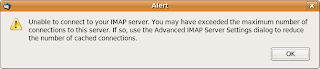
Something must have changed at the mail server over the weekend. Using the Web client, things were all fine, so this may be a Thunderbird and IMAP setting problem. At the client side, do the following to clear it. Originally I had the value 5 for the number of cached connections.
Step 1: Open Thunderbird. Choose Edit ->Account Settings
Step 2: Identify which account having the IMAP Alert problem and choose Server Settings and click on Advanced.
Step 3: In Maximum number of connections to cache from 5 to four. If this value does not work, keep reducing by one.
Step 4: Click OK. A second time OK to accept the changes.
Step 5: Restart Thunderbird to ensure things are reset. However, it still did work without restarting.
The "This body part will be downloaded on demand." message.
When the body of an email says "This body part will be downloaded on demand." and the attachments seem corrupted you cant access the Email.
Possibility 1: You are in offline mode and the downloads have been restricted.
Ensure the View -> Display Attachments Inline is checked.
Possibility 2: The message headers go messed up.
Rebuild the specific folder index table. Rebuilding the .msf file for that folder. Right click on the folder, select properties, general information and then press the "Rebuild Index" button. If that doesn't recover all of the messages its probably due to your folder being corrupted.
See Mozillazine
--
The Thunderbird 2.0.0.14 email client on Ubuntu 7.10 took some getting use to. Today something had to happen. The IMAP server returned an error on my Thunderbird (email client) with the following Alert popup.

Something must have changed at the mail server over the weekend. Using the Web client, things were all fine, so this may be a Thunderbird and IMAP setting problem. At the client side, do the following to clear it. Originally I had the value 5 for the number of cached connections.
Step 1: Open Thunderbird. Choose Edit ->Account Settings
Step 2: Identify which account having the IMAP Alert problem and choose Server Settings and click on Advanced.
Step 3: In Maximum number of connections to cache from 5 to four. If this value does not work, keep reducing by one.
Step 4: Click OK. A second time OK to accept the changes.
Step 5: Restart Thunderbird to ensure things are reset. However, it still did work without restarting.
The "This body part will be downloaded on demand." message.
When the body of an email says "This body part will be downloaded on demand." and the attachments seem corrupted you cant access the Email.
Possibility 1: You are in offline mode and the downloads have been restricted.
Ensure the View -> Display Attachments Inline is checked.
Possibility 2: The message headers go messed up.
Rebuild the specific folder index table. Rebuilding the .msf file for that folder. Right click on the folder, select properties, general information and then press the "Rebuild Index" button. If that doesn't recover all of the messages its probably due to your folder being corrupted.
See Mozillazine
--
Subscribe to:
Posts (Atom)