My notes on Android development
Install Eclipse and the java base (about 256Mb)
Install Java
Ubuntu 10.04 provides Java6 in the form of OpenJDK (openjdk-6-jdk). This is great for developers, but for those who wants to install Sun (Oracle) version of Java6, I will also provide the steps here
A) Install OpenJDK (check if its already installed before doing this!)
Step 1: open a terminal and type the following;
update-alternatives --query java
If you already have OpenJDK, then you do not need to install it anymore. If you do not have any Java JDK listed, then continue to step 2.
Step 2:
sudo apt-get install openjdk-6-jdk openjdk-6-jdk icedtea6-plugin
B) Install Sun (Oracle) Java JDK.
Step 1: Add the repository for Sun Java. Open a terminal and type the following;
sudo add-apt-repository "deb http://archive.canonical.com/ lucid partner"
sudo apt-get update
Step 2: Install the JDK along with the plugin
sudo apt-get install sun-java6-jdk sun-java6-plugin
Step 3: Make it your default
Sun Java is now installed, but you need to make it the default java to use:
sudo update-alternatives --config java
Install Eclipse
Open a terminal and type;
sudo apt-get install eclipse eclipse-pde eclipse-jdt eclipse-plugin-cvs
Install Android plugin for Eclipse
Refer for details at Android.com
Download and add the Eclipse plugin for Android by (update 15 Feb 2010)
wget http://dl.google.com/android/android-sdk_r09-linux_x86.tgz
wget http://dl.google.com/android/ADT_9.0.0.zip
previous post was;
$ wget http://dl.google.com/android/ADT-0.9.7.zip
The tgz is for the android SDK.
Sunday, August 15, 2010


Friday, August 6, 2010
Sunday, July 25, 2010
Applications that need the .Net framework on Linux
The Genting web site gave some challenges to book their shows. It was directing Firefox to install Silverlight (a MS Windows based programme). On Linux, this is done via the Moonlight package. Here are things I tried on Kubuntu 9.10 using Firefox version 3.5.9
1. Installed via the terminal
sudo apt-get install moonlight-plugin-mozilla
Still cant work...maybe its Mono 1.0?
2. Installed the Mono 2.0 via URL http://go-mono.com/moonlight/download.aspx
Still cant work!
3. Installed the prerelease Mono version 3 via the URL http://go-mono.com/moonlight/prerelease.aspx
The size was 13.2Mb
Still cant work! Firefox keep closing (crash) each time I click on that page.
I am sending rwgenting a feedback.
Those websites who choose to use the .Net framework keeps most Linux users away from their services. Unless there are plans to get these fixed. If anyone have gone to rwgenting to do booking of shows on a Linux machine and it works, do let me know how it can be done.
1. Installed via the terminal
sudo apt-get install moonlight-plugin-mozilla
Still cant work...maybe its Mono 1.0?
2. Installed the Mono 2.0 via URL http://go-mono.com/moonlight/download.aspx
Still cant work!
3. Installed the prerelease Mono version 3 via the URL http://go-mono.com/moonlight/prerelease.aspx
The size was 13.2Mb
Still cant work! Firefox keep closing (crash) each time I click on that page.
I am sending rwgenting a feedback.
Those websites who choose to use the .Net framework keeps most Linux users away from their services. Unless there are plans to get these fixed. If anyone have gone to rwgenting to do booking of shows on a Linux machine and it works, do let me know how it can be done.
Wednesday, June 30, 2010
Android on Sony Ericsson
The Sony Ericsson X10 runs on Android operating system. This is an X window on linux kernel 2.6.29-rel. Its really responsive in my
opinion when I do the following;
1. Using the standard virtual keyboard.
2. Switching between application.
3. Using Timescape to read messages and mediascape for multimedia.
Among the 10 main apps I Installed and will keep;
1. Dolphin web browser.
2. MP3 download.
3. Ringtone Editor.
4. Task manager.
5. PasswdSafe.
6. Astro File Manager +smb module.
7. Connect Bot.
8. Android vnc viewer.
9. EASYNOTE.
10. Mytask.
But i still cant open OOo documents. PDF AND MS WORD WORKED!
Next, android will be on tablet PCs like the Cisco Cius.
The Android can be built with ecipse and the java development kit. See
http://www.alittlemadness.com/2010/06/07/understanding-the-android-build-process
opinion when I do the following;
1. Using the standard virtual keyboard.
2. Switching between application.
3. Using Timescape to read messages and mediascape for multimedia.
Among the 10 main apps I Installed and will keep;
1. Dolphin web browser.
2. MP3 download.
3. Ringtone Editor.
4. Task manager.
5. PasswdSafe.
6. Astro File Manager +smb module.
7. Connect Bot.
8. Android vnc viewer.
9. EASYNOTE.
10. Mytask.
But i still cant open OOo documents. PDF AND MS WORD WORKED!
Next, android will be on tablet PCs like the Cisco Cius.
The Android can be built with ecipse and the java development kit. See
http://www.alittlemadness.com/2010/06/07/understanding-the-android-build-process
Monday, May 24, 2010
Convert AVHCD to AVI and burn as VCD
Getting AVHCD from a video camera into a PC a making it into a VCD. This is a weekend project.
Next, AVIs are great for the PC, however, to distribute to people who do not use PCs to watch movies or just to have a larger screen, it is better to convert the AVI into a VCD.
Step 1: Copy the files from the AVHCD camera
CAMERA: /media/disk-1/PRIVATE/AVCHD/BDMV/STREAM
PC: ~/Documents
Step 2: Convert to AVI.
Future action can consider direct preparation for MPG. Here it is in AVI because there was a need for me to prepare in various format apart from MPG or VCD.
Start KDENLive
- File -> Save As ->
- Project -> Add clip
- In the Project Tree window, drag the clips into the timeslots (bottow window)
- Click Render button ->AVI DV
Step 3: Get the converter programme called vcdimager
$ sudo apt-get install vcdimager
Step 4: Convert to mpg and the cue / bin
ffmpeg -i inputfile.avi -target pal-vcd outfilename.mpg
# create the cue and bin files. The label did not allow for spaces.
vcdimager -t vcd2 -l"Martha-Swimming-May-2010" -c vcd2.cue -b vcd2.bin outfilename.mpg
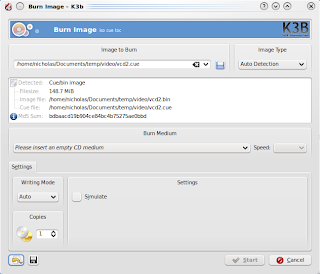
Step 5: Using K3B, choose project for Burn Image
Insert a blank CDROM
Image to burn ->Select the .cue file.
Image type ->Cue/bin
Click "Start"
===========
Using:
K3B version 1.68.0
KDE 4.3.2
CDRDAO 1.2.2
VCDimager 0.7.23
Kubuntu 9.10
===========
Next, AVIs are great for the PC, however, to distribute to people who do not use PCs to watch movies or just to have a larger screen, it is better to convert the AVI into a VCD.
Step 1: Copy the files from the AVHCD camera
CAMERA: /media/disk-1/PRIVATE/AVCHD/BDMV/STREAM
PC: ~/Documents
Step 2: Convert to AVI.
Future action can consider direct preparation for MPG. Here it is in AVI because there was a need for me to prepare in various format apart from MPG or VCD.
Start KDENLive
- File -> Save As ->
- Project -> Add clip
- In the Project Tree window, drag the clips into the ti
- Click Render button ->AVI DV
Step 3: Get the converter programme called vcdimager
$ sudo apt-get install vcdimager
ffmpeg -i inputfile.avi -target pal-vcd outfilename.mpg
# create the cue and bin files. The label did not allow for spaces.
vcdimager -t vcd2 -l"Martha-Swimming-May-2010" -c vcd2.cue -b vcd2.bin outfilename.mpg
Step 5: Using K3B, choose project for Burn Image
Insert a blank CDROM
Image to burn ->Select the .cue file.
Click "Start"

Using:
K3B version 1.68.0
KDE 4.3.2
CDRDAO 1.2.2
VCDimager 0.7.23
Kubuntu 9.10
===========
Sunday, May 23, 2010
Add Screensavers in KDE4
Screensavers are graphics that replaces the normal desktop screen when it is idle too long (it depends on the user setting). This should reduce the burnout of the screen and also hides the desktop contents from passing eyes.
Default install of Kubuntu did not have any of the nice screensavers. Check the screensavers by choosing the KMenu ->system Settings
Choose the General tab ->Desktop ->Screen saver
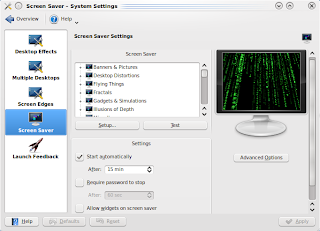
To install additional screensaver, use the Software Management such as KPackagekit or synaptic and install
kscreensaver-xsavers-extra
This can also be done at the terminal by typing
$ sudo apt-get install kscreensaver-xsavers-extra
This installs
kscreensaver
kscreensaver-xsavers
kscreensaver-xsavers-extra
libgle3
netpbm
xscreensaver
xscreensaver-data
xscreensaver-data-extra
xscreensaver-gl
xscreensaver-gl-extra
Install optional items;
$ sudo apt-get install xfishtank qcam streamer
Default install of Kubuntu did not have any of the nice screensavers. Check the screensavers by choosing the KMenu ->system Settings
Choose the General tab ->Desktop ->Screen saver

To install additional screensaver, use the Software Management such as KPackagekit or synaptic and install
kscreensaver-xsavers-extra
This can also be done at the terminal by typing
$ sudo apt-get install kscreensaver-xsavers-extra
This installs
kscreensaver
kscreensaver-xsavers
kscreensaver-xsavers-extra
libgle3
netpbm
xscreensaver
xscreensaver-data
xscreensaver-data-extra
xscreensaver-gl
xscreensaver-gl-extra
Install optional items;
$ sudo apt-get install xfishtank qcam streamer
Saturday, May 22, 2010
Start programming with QT4
If you ever are into open source software, eventually contribution of codes becomes part of the cycle. Trolltech from Oslo, Norway popularised the QT, which is a set of programming libraries that is used to develop graphical applications. In Linux, there is the KDE desktop manager that uses the QT libraries. Other popular applications that use QT are Opera,
Here is a guide to get started with QT programming (qt4 in this case) on Kubuntu 9.10. You will need the demo and the Graphical development tool
A. Setting up the environment
Step 1: Install the libraries and compilers. This include libraries such as "QLabel" and QLayout from the QtGui
$ sudo apt-get install build-essential kdelibs4-dev libqt4-qt3support libqt4-assistant
Step 2: Install the demos
$ sudo apt-get install qt4-demos
Step 3: Configure Linux to compile with qt4 instead of the default qt3
$ sudo update-alternatives --config qmake
Step 4: # install the Graphical development tool
$ sudo apt-get install kdevelop
Step 5: Read info on QT4 through the manuals at /usr/share/qt4/doc/html/index.html
$ assistant-qt4
B. General programming setup of project, compiling and execute
Step 1: Create the source files. E.g. .cpp, .h, etc.
Just copy from the demo files in /usr/lib/qt4/examples. I will use files from the example tabdialogs.
$ cp -r /usr/lib/qt4/examples/dialogs/tabdialog/ ~
$ cd ~/tabdialog
Step 2: Create the project file. The project file (.pro) define headers, sources, form and other files which the application consists of.
$ qmake -project
Step 3: Compile
$ qmake
$ make
Step 4: Run the programmes.
$ ./tabdialog
Alternatively, use the KDevelop to manage the project. Start KDevelop and open to .pro file.
$ kdevelop
C. References
Here is a guide to get started with QT programming (qt4 in this case) on Kubuntu 9.10. You will need the demo and the Graphical development tool
A. Setting up the environment
Step 1: Install the libraries and compilers. This include libraries such as "QLabel" and QLayout from the QtGui
$ sudo apt-get install build-essential kdelibs4-dev libqt4-qt3support libqt4-assistant
Step 2: Install the demos
$ sudo apt-get install qt4-demos
Step 3: Configure Linux to compile with qt4 instead of the default qt3
$ sudo update-alternatives --config qmake
Step 4: # install the Graphical development tool
$ sudo apt-get install kdevelop
Step 5: Read info on QT4 through the manuals at /usr/share/qt4/doc/html/index.html
$ assistant-qt4
B. General programming setup of project, compiling and execute
Step 1: Create the source files. E.g. .cpp, .h, etc.
Just copy from the demo files in /usr/lib/qt4/examples. I will use files from the example tabdialogs.
$ cp -r /usr/lib/qt4/examples/dialogs/tabdialog/ ~
$ cd ~/tabdialog
Step 2: Create the project file. The project file (.pro) define headers, sources, form and other files which the application consists of.
$ qmake -project
Step 3: Compile
$ qmake
$ make
Step 4: Run the programmes.
$ ./tabdialog
Alternatively, use the KDevelop to manage the project. Start KDevelop and open to .pro file.
$ kdevelop
C. References
- http://zetcode.com/tutorials/qt4tutorial/
- http://sector.ynet.sk/qt4-tutorial/my-first-qt-gui-application.html
- http://qt-apps.org/
Tuesday, May 4, 2010
Scanning the hard disk status
The hard disk performance effects how people perceive their Linux box. If you say a system is slow, what is causing this? There are many reasons, among them are;
too many programmes running, lower processing speed of hardware, insufficient resources, etc.
You can use basic linux tools to give readings on the hard disk for benchmark purpose. Here are among commands that anyone can use via a terminal;
Details on how to use the above commands can be found in the respective man pages.
Now you can tell someone, my disk is faster than yours.
too many programmes running, lower processing speed of hardware, insufficient resources, etc.
You can use basic linux tools to give readings on the hard disk for benchmark purpose. Here are among commands that anyone can use via a terminal;
- Get timing of cache and device reads on inactive systems. This means nothing else is running during the test.
hdparm -tT /dev/sda - Shows the files opened by processes.
lsof - Monitor balance between input/output load of physical disk using the sysstat package. iostat -x
- Space on mounted devices.
df -h - Monitor load on a Linux system, default every 10 second updated.
atop
Details on how to use the above commands can be found in the respective man pages.
Now you can tell someone, my disk is faster than yours.
Thursday, April 29, 2010
Impressive Impress and Converting Slides to AVI
Just completed an Impress slide and converted into AVI and MPEG. Final presentation was in AVI, the MPEG can be used for the web as its only half the AVI size.
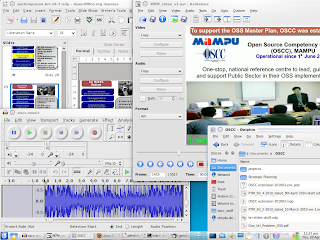
Tools useds;
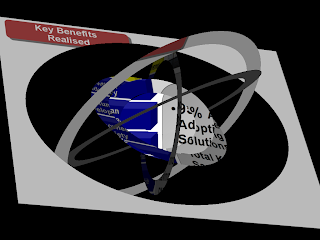
The Impress extensions installed to improve the presentation was "Presentation Minimiser" to reduce the slide file size and "openoffice.org-ogltrans" to add slide transitions. Here are examples of how the additional slide transitions looked like.
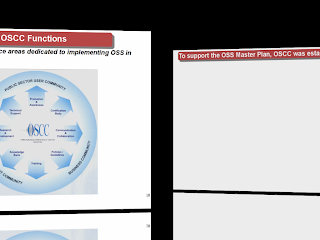



Tools useds;
- Slides - OpenOffice.org 3.1 Impress
- Recording slides - recordmydesktop
- Video editing - Avidemux
- Graphics - GIMP
- Audio - Audacity
- OGV to AVI converter - mencoder
- AVI to MPEG converter - Download helper (extension for firefox) + mencoder
- Operating System - Ubuntu & Kubuntu (2 PCs)
The Impress extensions installed to improve the presentation was "Presentation Minimiser" to reduce the slide file size and "openoffice.org-ogltrans" to add slide transitions. Here are examples of how the additional slide transitions looked like.


Friday, April 23, 2010
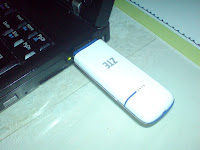
Installing ZTE MF110 on Ubuntu Linux
Maxis offered their broadband along with the ZTE's MF110 HSUPA modem. Thus far, I have not gotten a chance to get a Digi offer to try their broadband,....maybe some day.
The MF110 features
Network: HSUPA/HSDPA/UMTS 2100 MHz,EDGE/GPRS/GSM 850/900/1800/1900MHz
Data transmission speeds: 7.2Mbps DL 5.76Mbps UL
Weight: 21.5 gramme
Application: Join Air with SMS service, Data service, Applications management, Data concurrent. This allowed me to add other service providers (yet to be tested) with the same modem.
 Installation on Linux KUbuntu 9.10
Dial number: *99#
APN: static: maxisbb
username: maxis
password: wap
Connection has been pretty much inconsistent. Its fast at times, then no connection, then have to keep reloading the page. I like its thumbdrive size and the blinking lights. The Join Air application is also easy to read and use.
The MF110 features
Network: HSUPA/HSDPA/UMTS 2100 MHz,EDGE/GPRS/GSM 850/900/1800/1900MHz
Data transmission speeds: 7.2Mbps DL 5.76Mbps UL
Weight: 21.5 gramme
Application: Join Air with SMS service, Data service, Applications management, Data concurrent. This allowed me to add other service providers (yet to be tested) with the same modem.
 Installation on Linux KUbuntu 9.10
- Install wvdial from KPackageKit
- Plug the MF110 into the USB slot. Mount the MF110 and enter the directory "Linux"
- Extract "PCL_ZTEDCV.tar.gz" to your HOME directory.
- Open a terminal and type "sudo ./install.sh"
- Launch the application "Join Air" from the KMenu
- In Join Air, at the Internet menu (A globe icon), click "Connect". Minimise this window but do not close as its needed to maintain Internet connection.
- It connects directly with initial IP 121.121.X.X and tries to open the web page mylaunchpad.com.my
Dial number: *99#
APN: static: maxisbb
username: maxis
password: wap
Connection has been pretty much inconsistent. Its fast at times, then no connection, then have to keep reloading the page. I like its thumbdrive size and the blinking lights. The Join Air application is also easy to read and use.
Thursday, April 8, 2010
Naming USB drives
For the simple reason that USB drives go missing often is that they are portable and sometimes small. The best way to mark ownership is with one of the permanent marker pens. However, naming the USB drive will tell everyone who it belongs to when it is plugged in.
Just maybe, that missing USB drive containing your phone number will come back to you if found.
Here is how to name the disk on Kubuntu 9.10 or other similar Linux like CentOS.
Step 1:
Insert the USB disk and determine the device and partition. E.g. /dev/sdb1
Easily done with the mount command.
Step 2:
Unmount the disk (Do not unplug from the USB).
sudo umount /dev/sdb1
Step 3:
Check existing disk name
sudo mlabel -i /dev/sdb1 -s ::
Step 4:
Rename the disk label. E.g. below, replace the word "myphonenumber" with anything you like with a limit of 12 characters.
sudo mlabel -i /dev/sdb1 -s ::myphonenumber
Step 5:
Remove the USB disk, and reinsert back to confirm the name has changed.
For more details see ubuntu.com
Just maybe, that missing USB drive containing your phone number will come back to you if found.
Here is how to name the disk on Kubuntu 9.10 or other similar Linux like CentOS.
Step 1:
Insert the USB disk and determine the device and partition. E.g. /dev/sdb1
Easily done with the mount command.
Step 2:
Unmount the disk (Do not unplug from the USB).
sudo umount /dev/sdb1
Step 3:
Check existing disk name
sudo mlabel -i /dev/sdb1 -s ::
Step 4:
Rename the disk label. E.g. below, replace the word "myphonenumber" with anything you like with a limit of 12 characters.
sudo mlabel -i /dev/sdb1 -s ::myphonenumber
Step 5:
Remove the USB disk, and reinsert back to confirm the name has changed.
For more details see ubuntu.com
Tuesday, March 9, 2010
ThunderBird 2.0 Add-ons
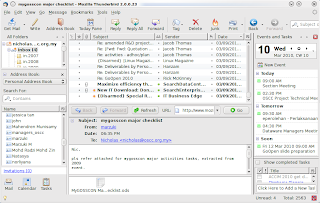
Thunderbird 2.0 reached EOL Aug 2009 but Thunderbird 3.0 still does not have all the stuff and attractions for an upgrade, so here I am still using Thunderbird 2.0. What is Thunderbird?
Its an Email client, Calendering, Task and Contact Management. Allows access to Email accounts via POP or IMAP. It also supports GMail accounts, Unix mailbox and Newsgroup account access. A really great application to work with.
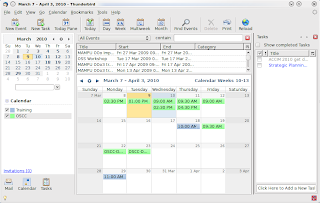
Some of the must have add-ons for my Thunderbird 2:
Other optional add-on:
Its an Email client, Calendering, Task and Contact Management. Allows access to Email accounts via POP or IMAP. It also supports GMail accounts, Unix mailbox and Newsgroup account access. A really great application to work with.
Some of the must have add-ons for my Thunderbird 2:
- Contacts Sidebar 0.7 - Allows me to forward VCards and access via F4 the addresses, copy and paste info of the VCard into email.
- Lightning 0.9 - The calendar and task Manager
- FG Printers 0.4.4 - Format printing if the calendars
- VCS Support 0.6.3.1 - Allows me to import/export VCS calendars
- Automatic Export 0.3.0 - Allows automatic backup of the calendars


Other optional add-on:
- Provider for Google Calendar
- Bidi Mail UI
- PGP
- Thunderbrowse

Thursday, March 4, 2010
Linux driver in use
From a terminal window;
To view all device drivers and the module names
$ lspci -k
To view a specific device (e.g. 03:00)
$ lspci -vv -s 03:00
To view all the loaded modules (The letter 'K' is uppercase in Kernel)
$ lsmod
$ lspci -k |grep Kernel
To view all device drivers and the module names
$ lspci -k
To view a specific device (e.g. 03:00)
$ lspci -vv -s 03:00
To view all the loaded modules (The letter 'K' is uppercase in Kernel)
$ lsmod
$ lspci -k |grep Kernel
Monday, March 1, 2010
Installing Kubuntu 9.10
Just did a fresh install for Kubuntu 9.10 based on my previous install. Here is a list of steps I took to get my most common applications working.
Post installation recommendations
Start the Kubuntu software(package) installer by Kmenu ->Application ->Systems ->KpackageKit
Post installation recommendations
Start the Kubuntu software(package) installer by Kmenu ->Application ->Systems ->KpackageKit
Choose following packages:
- openjdk-6-jre-hotspot
- mozilla-thunderbird-2.0.0.23
- lightning-extension
- flashplugin-installer
Install Firefox web browser
Choose Kmenu ->Internet ->Firefox Web Browser Installer
To allow Java applications to run in the web browser, open a terminal and install the openjdk plugin;
$ sudo apt-get install icedtea6-plugin
To get the wireless working, run at terminal this command and reboot. My wireless router for WPA, TKIP did not connect until following steps were taken. Open a terminal and type
$ sudo /etc/init.d/network-manager restart
Install the other stuff for common applications to be used. At the terminal run
$ sudo apt-get install msttcorefonts
For multimedia, fonts and assorted codecs support
This will add JRE, mp3, mpeg, odbc, unrar and other useful support.
$ sudo apt-get install kubuntu-restricted-extras
This allows the disk to be encrypted and manage passwords. Additional encryption can be downloaded from http://www.truecrypt.org/downloads or mediafire.
$ sudo apt-get install gdecrypt password-gorilla
Allow secure SSH connection to and from SSH servers.
$ sudo apt-get install ssh sshfs ksshaskpass kdessh
Install the VLC video player to watch CD and DVD movies.
$ sudo apt-get install vlc videolan-doc mozilla-plugin-vlc vlc-plugin-sdl libvcdinfo0
Install basic Thunderbird add-ons to enhance its usage. From a web browser enter the URL https://addons.mozilla.org/en-US/thunderbird
Download and install the following;
- Automatic Export
- Bidi Mail UI (not needed if installed as earlier)
- FG Printers
- Lightning (not needed if installed as earlier)
- Provider for Google Calendar (not needed if installed as earlier)
- Thunderbrowse
To improve web browsing, these are my download addons from https://addons.mozilla.org/en-US/firefox
- FoxTabs
- Speed Dials
- Zotero
- Server spy
- Video download helper
- Firebug
Wednesday, February 24, 2010
How a small office can switch to open source?
During small talk sessions the topic of having offices switching to Open Source Software (OSS) intrigued me to write this piece. Its in no mean very deep but gives you considerations to start the office moving towards a secure, efficient, cost saving and almost virus free environment.
Must have apps for the office hard working staff:
Once you have gotten all of the staff interested and comfy with the Linux desktop you can then start integrating with linux services in a networked office.
An office of 4 or more people should have a server or more with the following must have services:
There are loads of other projects that can be done once you have the above in order and your tech guy is happily getting used to OSS.
Must have apps for the office hard working staff:
- Office productivity suite (prepare letters, reports, spreadsheet and presentation slides) - OpenOffice.org
- Email clients - Thunderbird + Calendar
- Document viewer - Acrobat Reader
- Desktop publishing tools such as flyers and posters - Scribus
- Financial tool - GnuCash
- Project management and monitoring - OpenProj
- Graphics and photo editing tool - GIMP, F-SPOT, GwenView, XSane Image Scanning, Mobile Media Converter
- Backup data to CDROM or DVDROM, network - K3B, Simple Backup
- Web browsing - Firefox
- Encryption of files/data - GDecrypt, TrueCrypt, Password Gorilla
- Internet calls/VOIP - Skype
- Multimedia player - VLC
- Base apps/interpreter for other programmes to run - Java Runtime Environment, Flash, Wine, PHP5
Once you have gotten all of the staff interested and comfy with the Linux desktop you can then start integrating with linux services in a networked office.
An office of 4 or more people should have a server or more with the following must have services:
- Printer sharing - CUPS
- Cetralised file/document sharing - PLONE or Open Atrium
- Global address book - LDAP or Customer management suite (see below)
- Local DNS - BIND
- Customer management - vtiger or SugarCRM Community Edition (Asertiva)
- Automated networked backup - Bacula
- Centralised time server - NTPD
- Local email server? Most small office use public email services.
There are loads of other projects that can be done once you have the above in order and your tech guy is happily getting used to OSS.
Monday, February 8, 2010
MCRYPT module for PHP (RHEL5)
RHEL5.3 did not have support for the MCRYPT module that many PHP applications use to create basic security. Well, anyone could download mcrypt from sourceforge and recompile PHP to support this module. I found another way which I hope also will work for you;
Step 1: Login as admin and install MCRYPT
yum install mcrypt
Step 2: Install epel
http://download.fedora.redhat.com/pub/epel/5/i386/epel-release-5-3.noarch.rpm
rpm -Uvh epel-release*.rpm
Step 3: Install the module
yum install php-mcrypt.i386
Step 4: Restart Apache
service httpd restart
Confirmation of the installed module can be found from the phpinfo() page. The module I had included cipher for
cast-128
gost
rijndael-128
twofish
arcfour
cast-256
loki97
rijndael-192
saferplus
wake
blowfish-compat
des
rijndael-256
serpent
xtea
blowfish
enigma
rc2
tripledes
Step 1: Login as admin and install MCRYPT
yum install mcrypt
Step 2: Install epel
http://download.fedora.redhat.com/pub/epel/5/i386/epel-release-5-3.noarch.rpm
rpm -Uvh epel-release*.rpm
Step 3: Install the module
yum install php-mcrypt.i386
Step 4: Restart Apache
service httpd restart
Confirmation of the installed module can be found from the phpinfo() page. The module I had included cipher for
cast-128
gost
rijndael-128
twofish
arcfour
cast-256
loki97
rijndael-192
saferplus
wake
blowfish-compat
des
rijndael-256
serpent
xtea
blowfish
enigma
rc2
tripledes
Friday, February 5, 2010
Print repeat header in Calc
Calc is a great electronic spreadsheet and have lots of functions to create a diverse range of apps.
Since my upgrade to OpenOffice.org 3.1.1, I have not explored Calc much. When I tried to print a spreadsheet that ran across 40 pages. I tried to have the first 2 rows repeat as headers in every page, an error appeared "Invalid Sheet Range".
Solution:

Some trigger must have failed to detect the values as "Calc A1". Thank you Arnel for giving the solution in Oct 2009.
Since my upgrade to OpenOffice.org 3.1.1, I have not explored Calc much. When I tried to print a spreadsheet that ran across 40 pages. I tried to have the first 2 rows repeat as headers in every page, an error appeared "Invalid Sheet Range".
Solution:
- Open the Calc spreahsheet.
- In the menu choose Tools ->Option ->OpenOffice.org Calc ->Formula
- In Formula Syntax, it shows "Calc A1". Click on the dropdown box and choose "Calc A1".
- Click "Ok".
Some trigger must have failed to detect the values as "Calc A1". Thank you Arnel for giving the solution in Oct 2009.
Sunday, January 31, 2010
Oracle takes out the Sun
Oracle has finally taken over Sun Microsystems. Days of darkness are here but how long will it be?
 Sun is not only about hardware. What will happen to OpenOffice.org, Java and MySQL? How about the Sun and MySQL Certifications?
How will Jonathan, being the last Sun Microsystem's CEO end his career there?
All the debates are ongoing in the internet but I look forward to Oracle making clear statements on these concerns.
 Sun is not only about hardware. What will happen to OpenOffice.org, Java and MySQL? How about the Sun and MySQL Certifications?
How will Jonathan, being the last Sun Microsystem's CEO end his career there?
All the debates are ongoing in the internet but I look forward to Oracle making clear statements on these concerns.
Tuesday, January 26, 2010
Kubuntu 9.10 on PIII
Ubuntu released the 9.10 Karmic last year. Due to all the hectic schedule I finally managed to install Kubuntu 9.10 today.
Kubuntu is installed on a Pentium III with 200Mb RAM having 20Gb hard disk. Mouse is with the Nano wireless and keyboard is PS2. With the L2 cache being 512k, it should mean something to Kubuntu to run smoothly (almost). Working just ok, and the desktop looks neat. Swap is taking up 144Mb of the 1,400Mb allocated during installation.
Following are among the first thing I did after install;
1. Did a system update and removed the package kubuntu-firefox-installer.
2. Set the screen to resolution to 1024x768
3. Checked with Konqueror the Internet connection...connected to the broadband via router.
3. Used KPackagerKit to install Firefox 3.5
4. Added stuff like password gorilla, Kphotoalbum
List of things to do next:
1. Install Java and Flash
2. Get a PDF reader. Currently Okular is installed by default.
Kubuntu is installed on a Pentium III with 200Mb RAM having 20Gb hard disk. Mouse is with the Nano wireless and keyboard is PS2. With the L2 cache being 512k, it should mean something to Kubuntu to run smoothly (almost). Working just ok, and the desktop looks neat. Swap is taking up 144Mb of the 1,400Mb allocated during installation.
Following are among the first thing I did after install;
1. Did a system update and removed the package kubuntu-firefox-installer.
2. Set the screen to resolution to 1024x768
3. Checked with Konqueror the Internet connection...connected to the broadband via router.
3. Used KPackagerKit to install Firefox 3.5
4. Added stuff like password gorilla, Kphotoalbum
List of things to do next:
1. Install Java and Flash
2. Get a PDF reader. Currently Okular is installed by default.
Sunday, December 20, 2009
Enable user directories in Apache2
Its been a while since Apache2 was introduced. The configurations are found in apache2.conf and user specific settings can be added to httpd.conf in the /etc/apache2 directory. One major difference from previous version is the method to enable the user directory modules.
The Linux users can have their individual websites but this needs to be enabled and the web server restarted. At the command line type
sudo a2enmod userdir
sudo /etc/init.d/apache2 restart
This enables the Userdir module in /etc/apache2/mods-enabled/userdir.conf and users can create pages in the directory /home/username/public_html
This is managed by the directive
Other basic configurations can be
The Linux users can have their individual websites but this needs to be enabled and the web server restarted. At the command line type
sudo a2enmod userdir
sudo /etc/init.d/apache2 restart
This enables the Userdir module in /etc/apache2/mods-enabled/userdir.conf and users can create pages in the directory /home/username/public_html
This is managed by the directive
<directory /home/*/public_html>
Other basic configurations can be
- Disable a user from serving webpages (e.g. root and user1)
Userdir disabled root user1 - Access URL as http://servername/~username
Userdir public_html - Access URL as http://servername/web/username
Userdir web
Subscribe to:
Posts (Atom)